
2×2 4k Video Wall Controller
4.6Editor score
11 Splicing Modes
HDMI and DVI Input
180 Degree Rotation
This guide compares the top 10 HDMI Video Wall Controllers for creating seamless multi-screen displays with features like 4K support and bezel adjustment.
Creating a seamless multi-screen display requires a reliable HDMI Video Wall Controller to split and manage video signals across multiple panels effectively for any setup.
We evaluated ten leading controllers based on resolution support, display modes, audio extraction, and control options to help you find the perfect match for your project.
Each pick highlights key strengths and trade-offs so you can decide quickly while noting that availability and pricing may vary over time on major retail platforms.
4.6Editor score

4.8Editor score

4.2Editor score
The following table provides a side-by-side comparison of all ten controllers highlighting their core specifications and capabilities for quick reference.



This J-Tech Digital processor stands out as a top choice for building a seamless video wall with reliable performance and comprehensive features.
We may earn a commission when you buy through this link, at no additional cost to you.
It supports up to four displays with clear 1080p outputs and provides eight different display modes to match various screen layouts and configurations.
While the input supports 4K resolution the outputs are fixed at 1080p which may limit ultra high definition viewing on native 4K panels.
Buyers seeking a dependable controller with strong customer service and useful audio extraction tools will find this model a solid investment for their setup.
The edge masking function lets you trim output edges by eight pixels to reduce visible bezels for a cleaner look.
Free lifetime technical support is available from the Stafford team to help resolve setup issues quickly and efficiently.
We may earn a commission when you buy through this link, at no additional cost to you.
This controller offers an accessible price point while delivering essential video wall functionality including DVI input and multiple splicing options.
We may earn a commission when you buy through this link, at no additional cost to you.
It supports up to 4K inputs via HDMI and provides eleven distinct display modes to handle various layouts for advertising or information displays.
The DVI input lacks 4K capability and the interface remains simple which may limit advanced users seeking granular control over display parameters.
Ideal for tight budgets this unit delivers core features without complexity and includes useful memory functions to retain settings after power cycles.
The memory function remembers your last settings when plugged in again so you do not need to reconfigure after power outages.
Control options include IR remote RS232 and button presses offering flexibility for both quick changes and automated systems.
We may earn a commission when you buy through this link, at no additional cost to you.
This high-end controller brings professional-grade capabilities including 4K60Hz input and web-based management for sophisticated video wall installations.
We may earn a commission when you buy through this link, at no additional cost to you.
Users can route signals seamlessly without picture loss while using LAN and web controls to manage displays from anywhere on the network.
The advanced feature set comes with a premium price and a learning curve that may deter casual users looking for simple plug-and-play operation.
It is best suited for commercial or enterprise environments where reliability control and high-resolution performance are critical requirements for success.
Web control allows administrators to manage the video wall remotely over LAN without needing physical access to the controller unit.
Switching between sources happens without delay or picture loss which is essential for professional displays that cannot tolerate interruption.
We may earn a commission when you buy through this link, at no additional cost to you.
This OREI processor adds USB-C input flexibility alongside standard HDMI and supports robust audio extraction for connected sound systems.
We may earn a commission when you buy through this link, at no additional cost to you.
It handles multiple display configurations and provides RS-232 control for automated setups while offering audio extraction via optical outputs.
The lack of HDR10 and Dolby Vision support may limit compatibility with modern media players that rely on high dynamic range content.
Users needing USB-C connectivity and reliable audio routing will appreciate its balanced feature set and responsive technical support from the brand.
USB-C input allows direct connection from laptops and devices without needing an additional HDMI adapter for simpler cabling.
Audio extraction via SPDIF optical and L/R outputs ensures you can send sound to external speakers without audio lag.
We may earn a commission when you buy through this link, at no additional cost to you.
Another OREI model emphasizes bezel adjustment and EDID management to optimize screen layouts for commercial displays and retail signage.
We may earn a commission when you buy through this link, at no additional cost to you.
It supports 4K inputs at 60Hz and provides dual voltage power for international use alongside RS-232 control for automation systems.
Output resolution remains at 1080p and HDR is unsupported which may reduce visual quality for content relying on high dynamic range imaging.
Prospective buyers prioritizing bezel control and international power options will find this controller a capable choice for flexible multi-screen deployments.
EDID management helps the system identify connected displays and optimize signal routing for stable performance across all screens.
Bezel adjustment tools let you fine-tune content positioning to reduce visible gaps between screens for a more seamless appearance.
We may earn a commission when you buy through this link, at no additional cost to you.
This 4×4 matrix model expands beyond basic wall controllers to enable switching between multiple sources with seamless transition capabilities.
We may earn a commission when you buy through this link, at no additional cost to you.
Web control and advanced EDID help manage complex configurations while supporting rich audio formats like Dolby TrueHD for premium sound systems.
The expanded matrix functionality and higher price point make it more suitable for larger installations than simple four-screen display setups.
Anyone needing flexible source switching alongside video wall features will benefit from its scalable design and robust audio format compatibility.
Matrix functionality allows you to switch any of four sources to any of four displays independently for maximum flexibility.
Support for Dolby TrueHD and DTS-HD ensures audio remains high quality when routing signals to external surround sound systems.
We may earn a commission when you buy through this link, at no additional cost to you.
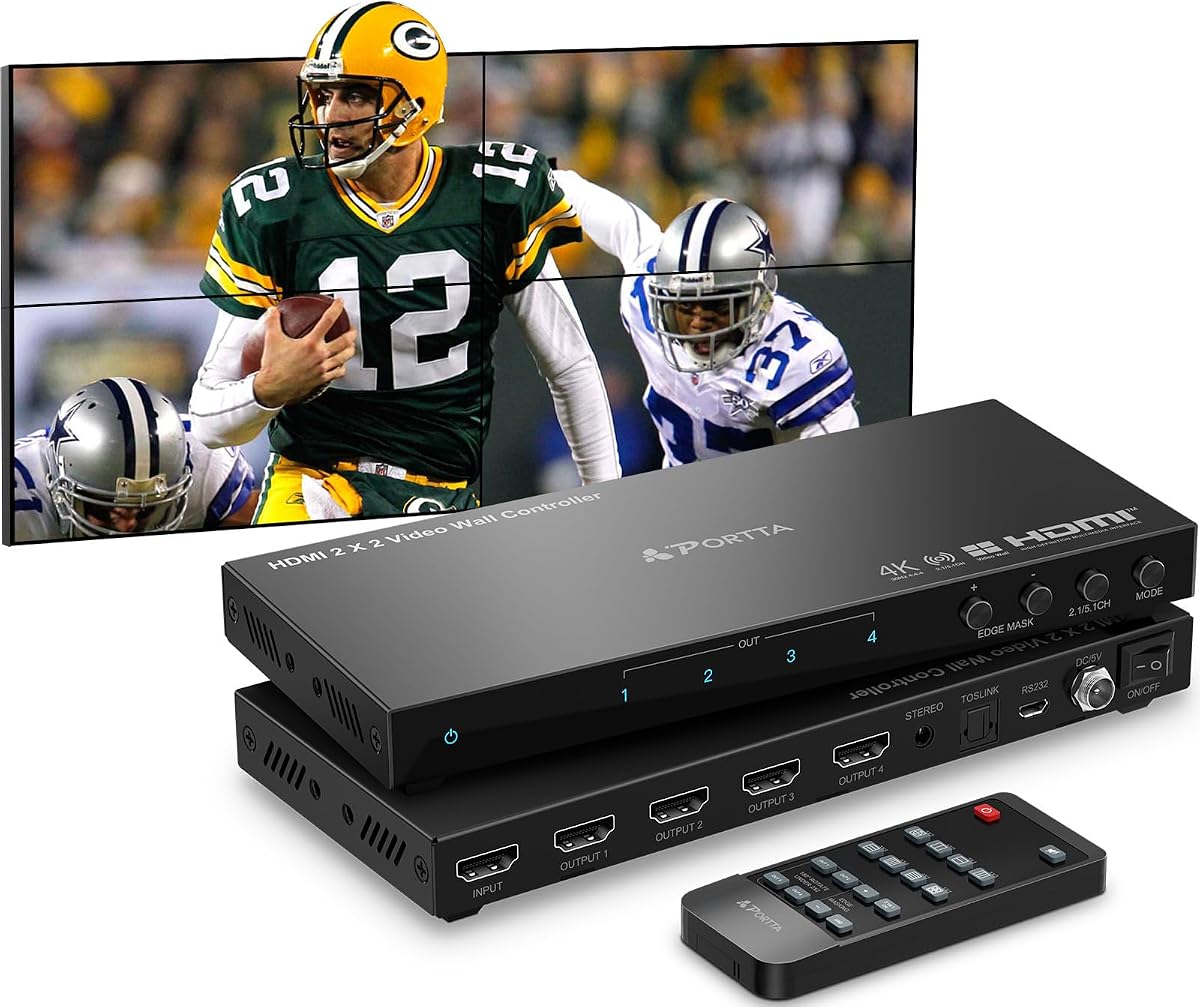
PORTTA offers a controller with eleven splicing modes and reliable RS232 control suited for automated environments needing consistent performance.
We may earn a commission when you buy through this link, at no additional cost to you.
It supports audio extraction via Toslink and provides mounting ears to facilitate secure installation of the unit alongside display panels.
Fixed 1080p outputs and lack of HDR mean the unit prioritizes stability over cutting edge resolution for demanding modern content playback.
Prospective buyers wanting extensive mode choices and strong warranty coverage will find this unit a dependable option for commercial display needs.
Eleven splicing modes provide flexibility to arrange screens vertically horizontally or in mixed layouts for specific display requirements.
Included mounting ears allow easy attachment to racks or walls to keep the controller secure during operation.
We may earn a commission when you buy through this link, at no additional cost to you.
ISEEVY model supports full 4K60Hz outputs on all four ports delivering sharp visuals for high resolution displays without resolution constraints.
We may earn a commission when you buy through this link, at no additional cost to you.
It accepts HDMI and USB-C inputs and offers 180 degree rotation to accommodate portrait installations and reduce bezel gaps effectively.
Mode selection is narrower than competitors and audio options remain basic which may limit use cases requiring complex audio routing capabilities.
Buyers focused on delivering native 4K visuals will appreciate its output fidelity and stable operation designed for continuous twenty four seven use.
All four outputs support 4K resolution enabling true high definition video walls without downscaling content for display panels.
Professional design supports stable operation for twenty four seven use ensuring continuous uptime for public displays.
We may earn a commission when you buy through this link, at no additional cost to you.
This unit adds direct USB playback and image adjustment tools making it versatile for standalone signage without needing a source computer.
We may earn a commission when you buy through this link, at no additional cost to you.
Users can display video and images from USB drives and adjust brightness and color temperature for optimal visibility in different lighting.
USB playback supports specific file types and lacks web control which limits integration with networked management systems for large deployments.
Those needing standalone media playback and image tuning options will value its flexibility and user friendly setup for simple video walls.
USB auto display detects inserted drives and plays content automatically reducing manual setup for digital signage or kiosks.
Adjustable brightness contrast and color temperature help optimize the display for ambient lighting conditions and viewing angles.
We may earn a commission when you buy through this link, at no additional cost to you.
ISEEVY expands capacity to six screens allowing larger video walls for big installations needing extended display area and flexible layouts.
We may earn a commission when you buy through this link, at no additional cost to you.
It supports HDMI and USB-C inputs and provides 180 degree rotation to accommodate diverse TV orientations for optimal viewing angles.
The six output design is specialized for larger displays and may exceed needs for smaller setups requiring fewer screens and simpler operation.
Anyone planning a large-scale video wall will find its scalable design and reliable operation suitable for extensive digital signage applications.
Six HDMI outputs enable video walls with up to six screens for expanded content display in larger spaces.
Layout modes include 2×3 and 3×2 configurations providing options for wide or tall displays depending on wall space.
We may earn a commission when you buy through this link, at no additional cost to you.
Selecting the right controller requires understanding resolution support input types and control methods that match your display needs.
Check whether the controller supports the native resolution of your displays especially if using 4K panels to ensure clear visuals without downsampling or blurring.
Confirm that the HDMI version supports the bandwidth needed for your target frame rate and color depth to avoid bottlenecks during playback.
Verify that the controller has enough HDMI inputs for your source devices and whether it supports USB-C or DVI if you need those connections.
Ensure the number of outputs matches your screen count and that the ports support the resolution you plan to output to each display.
Look for controllers that offer multiple display modes such as 2×2 1×4 or 1×2 to match your physical arrangement of screens.
Check for edge masking or bezel adjustment features to minimize visible gaps between screens for a seamless visual experience.
If you need separate audio routing choose a controller with optical or analog outputs to send sound to external speakers without latency.
Confirm audio format support like Dolby Digital or PCM to ensure compatibility with your sound system for high quality playback.
Decide whether manual remote control RS-232 or web-based control fits your workflow especially if you need remote management or automated switching.
Check for memory functions that save your settings after power cycles so you do not need to reconfigure every time the system restarts.
Review product ratings and warranty terms to ensure reliability especially for commercial environments where continuous operation is critical for daily use.
Consider whether the manufacturer offers lifetime technical support to help with setup and troubleshooting if issues arise during installation.
Verify HDCP support and compatibility with your specific source devices such as gaming consoles or media players to avoid signal handshake issues.
Ensure the controller supports the formats and codecs you plan to use so videos and images play correctly without conversion errors.
Check whether the unit has dual voltage capability or requires an adapter for use in regions with different power standards to ensure safe operation.
Confirm the controller is rated for twenty four seven operation if you need continuous display availability without downtime or maintenance delays.
Start by connecting your source devices to the input ports and your displays to the output ports using high speed HDMI cables that match your resolution requirements.
Power on the controller and then the displays to allow EDID communication to occur so the system correctly detects connected screens and adjusts signals.
Use the remote control or software interface to select your desired display mode and adjust bezel settings to align images across screens for a unified look.
Most entry level models do not support HDR10 or Dolby Vision due to bandwidth and processing limits. Higher end professional units may support HDR depending on their specific specifications and chipset design.
It is possible but results vary since mismatched resolutions or pixel counts can create alignment issues. Use edge masking and bezel tools to compensate for gaps.
Use certified high speed HDMI cables rated for 4K at 60Hz to avoid signal loss or dropouts. Longer runs may need active cables or signal boosters.
Most controllers offer 180 degree rotation options in their settings to match portrait mounted displays. You may also need to rotate your source device output.
Many controllers work with consoles but latency may increase. Look for low latency processing modes and check HDCP compatibility to avoid signal blocking.
Controllers with RS-232 or LAN/web control can be managed through centralized software. Check if the manufacturer provides API tools for multi-unit setup.
Whether you select the budget friendly 2×2 controller or the premium J-Tech model focus on resolution support audio routing and control methods that match your use case.
Prioritize bezel adjustment edge masking and stable performance to ensure your video wall looks seamless and operates reliably in daily deployments.
Always check current availability and specifications before purchase as features and compatibility may vary by unit and region for optimal results.