
VOYEE PC Controller
4.3Editor score
Compatible with Windows 11
Rumble feedback included
Ergonomic grip design
Discover the top rated joysticks for Windows 11 flight sims and games. This guide compares the best controllers including budget picks and high end options.
Finding the right joystick for Windows 11 can transform your flight simulation experience. A quality controller offers precise input, ergonomic comfort, and reliable connectivity for hours of immersive gameplay.
We evaluated ten top models based on compatibility, build quality, feature sets, and user feedback. This list covers everything from budget friendly gamepads to professional grade flight sticks designed for serious simmers.
Each selection highlights key strengths, potential drawbacks, and ideal use cases. Note that pricing fluctuates frequently so check current deals before purchasing to ensure you get the best value for your setup.
4.3Editor score

4.4Editor score

4.0Editor score
The following table provides a side by side overview of all ten products featured in this guide. Compare key specifications and features at a glance to find the perfect match for your flight simulation needs.






The PXN 2113PRO stands out as an accessible entry point for flight simulation enthusiasts. With a rating of 3.6 stars it delivers basic functionality for Windows 11 users without a high cost.
We may earn a commission when you buy through this link, at no additional cost to you.
Its 12 programmable buttons and 4 axis control allow for meaningful interaction with titles like Microsoft Flight Simulator and War Thunder. The vibration feature adds tactile feedback when configured correctly in the driver settings.
Users should note that vibration performance depends heavily on system configuration. Additionally the build feels less robust than premium models which may impact long term durability under heavy use.
This controller suits casual gamers or those testing the waters of flight sims. If you need a reliable budget stick for desktop use the PXN 2113PRO offers solid value for the price.
This joystick provides a low cost way to experience flight simulation without sacrificing core controls or basic feedback features.
The included driver lets users map keys and adjust sensitivity to match their preferred aircraft control layouts in popular sim titles.
We may earn a commission when you buy through this link, at no additional cost to you.
The Thrustmaster T-Flight Hotas One earns high praise for its modular design and solid performance. It scores a 4.4 rating reflecting user satisfaction with its ergonomic comfort and reliability on Windows 11.
We may earn a commission when you buy through this link, at no additional cost to you.
Its detachable throttle allows flexible setups whether on a desk or lap. The adjustable resistance provides realistic aircraft feel while the extensive button count supports complex flight operations without keyboard reliance.
While it lacks included foot pedals the expandable ecosystem lets users add rudder pedals later. Some users may find cable routing tricky on smaller desks but the benefits outweigh this minor inconvenience.
This model is ideal for intermediate simmers seeking a balance of quality and versatility. It works seamlessly with popular sim software and offers room to grow your cockpit over time.
The ability to separate stick and throttle helps save desk space and adapt to different seating arrangements comfortably.
Compatible with add-ons like rudder pedals this system grows with your skills and investment in flight simulation gear.
We may earn a commission when you buy through this link, at no additional cost to you.
The V-one Wired USB Controller targets versatile users needing a single device for PC and mobile gaming. It holds a 4.2 rating and works on Windows 11 alongside Android and PS3 systems for broad utility.
We may earn a commission when you buy through this link, at no additional cost to you.
With support for Xinput Dinput and Android modes this controller adapts to various game types. The vibration feedback and turbo function enhance gameplay without requiring complex setup or additional software.
Flight simulation fans may find its layout less specialized than dedicated sticks. However it remains an excellent choice for casual flying games or general arcade titles where simplicity and portability matter most.
Buyers looking for a flexible controller across multiple devices will appreciate this model. It delivers consistent performance for everyday gaming without demanding high end hardware or setup efforts.
This controller bridges PC and mobile gaming with broad compatibility that reduces the need for multiple devices.
Most systems recognize it instantly allowing quick access to games without lengthy driver installation processes.
We may earn a commission when you buy through this link, at no additional cost to you.
The Thrustmaster USB Joystick offers a simple solution for casual flight and action games. With a 3.9 rating it provides basic controls and a useful Point of View button for camera management on Windows 11.
We may earn a commission when you buy through this link, at no additional cost to you.
Its 3 axis and 4 button layout covers essential functions without overwhelming new users. The ergonomic handle rest ensures comfort during shorter sessions making it suitable for occasional gaming or travel setups.
Compared to advanced sticks it lacks programmable depth and precision sensors. However the compact size and plug and play ease make it a convenient choice for secondary rigs or smaller spaces.
This model works best for gamers who prioritize simplicity and portability. It fulfills basic flight control needs well though serious simmers may outgrow its features quickly.
Its small size allows placement on crowded desks or laptops without requiring significant surface area for operation.
The dedicated Point of View button enables quick angle changes during combat or exploration without reaching for keyboard keys.
We may earn a commission when you buy through this link, at no additional cost to you.
The Microsoft Sidewinder Precision 2 is a legacy favorite known for its robust feel and integrated rudder control. It maintains a 4.0 rating among users who value tactile feedback and precise axis movement on Windows 11.
We may earn a commission when you buy through this link, at no additional cost to you.
Its 146 degree throttle and rotating handle provide full aircraft control without external pedals. The 16 programmable functions let experienced pilots map complex commands for efficient in game management.
Driver support has waned over time which may require workarounds for some modern titles. However its physical durability and intuitive layout remain appealing for those seeking a sturdy standalone stick.
This joystick suits veterans of flight sims who prefer proven hardware over new features. If you appreciate analog precision and solid build quality this model delivers consistent performance year after year.
The rotating handle offers independent rudder control that enhances realism without requiring additional hardware purchases.
Designed to withstand extensive use this stick maintains consistent axis accuracy and button feel over many years.
We may earn a commission when you buy through this link, at no additional cost to you.
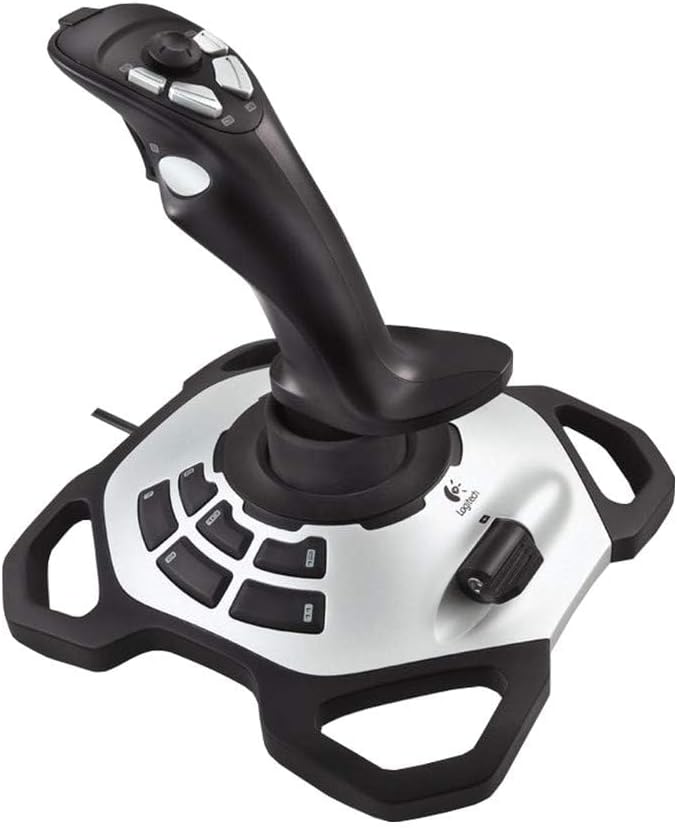
The Logitech Extreme 3D Pro delivers a well rounded experience for flight and combat simulations. It holds a 4.2 rating and offers a balanced mix of buttons and axes suitable for intermediate players on Windows 11.
We may earn a commission when you buy through this link, at no additional cost to you.
Its twist rudder and speed brake lever add essential flight mechanics without requiring separate pedals. The eight programmable buttons support common actions while the ergonomic base keeps the stick stable during intense maneuvers.
Lack of adjustable resistance may disappoint advanced users seeking variable tension. Still the consistent tracking and durable build make it a dependable choice for daily simulation practice and casual missions.
This stick is a safe investment for those upgrading from basic controllers. It provides the right level of precision and control for most popular flight titles without overwhelming complexity.
Integrated rudder and brake functions streamline operations allowing pilots to focus on navigation and combat strategies.
A heavy non slip base prevents unwanted movement during aggressive flying ensuring consistent axis input accuracy.
We may earn a commission when you buy through this link, at no additional cost to you.
The VOYEE PC Controller earns a Best Budget badge for its value and comfort. With a 4.3 rating it appeals to casual players and those seeking an affordable option for Windows 11 gaming setups.
We may earn a commission when you buy through this link, at no additional cost to you.
Its enhanced triggers and rumble feedback improve responsiveness during action sequences. The 7.2ft cord provides ample reach for comfortable positioning whether at a desk or couch.
While not tailored for flight sims it handles general games well. Users wanting precise aircraft control may need a dedicated stick but this controller excels at arcade and casual simulation titles.
This is the ideal choice for budget conscious gamers needing a reliable everyday controller. It delivers consistent performance and comfort without demanding a high upfront investment or complex setup.
Delivering solid features and comfort at a low price point this controller offers strong value for casual users.
Ergonomic grips and long cables reduce strain and improve positioning for extended gaming periods without fatigue.
We may earn a commission when you buy through this link, at no additional cost to you.
The Thrustmaster SimTask FarmStick targets farming simulation players with specialized controls for heavy machinery. Its 4.3 rating reflects high satisfaction from users who value precise input in titles like Farming Simulator 25.
We may earn a commission when you buy through this link, at no additional cost to you.
Hall effect sensors ensure long term accuracy without wear while 33 inputs manage complex equipment functions. The ambidextrous design allows flexible setups pairing with racing wheels or dual sticks for a full cockpit.
This joystick is not for flight sims but excels in agricultural scenarios. Users should note the requirement of a racing wheel for full functionality which adds to the overall investment cost.
For serious farming sim enthusiasts this tool provides unmatched control and precision. It transforms keyboard heavy gameplay into a tactile immersive experience tailored to the needs of virtual farm management.
Hall effect sensors provide consistent input that does not degrade over time ensuring reliable performance in demanding simulations.
Tailored for agricultural machinery this stick offers controls designed specifically for tractors and equipment in farming games.
We may earn a commission when you buy through this link, at no additional cost to you.
The Logitech G X56 H.O.T.A.S represents a premium flight system with unmatched control depth. It maintains a 4.0 rating and suits dedicated simmers willing to invest in a high fidelity cockpit setup for Windows 11.
We may earn a commission when you buy through this link, at no additional cost to you.
Its 189 programmable controls cover every aircraft function imaginable. The RGB lighting enhances immersion and helps identify buttons in low light while adjustable springs let users tailor stick tension to preference.
The large footprint and cost may deter casual users. However for VR or professional flight training this level of customization and precision delivers an unmatched immersive experience that rivals real aviation cockpits.
This system is the top choice for serious enthusiasts seeking the ultimate flight simulation experience. It combines extensive functionality with premium build quality to deliver professional grade performance at home.
With nearly two hundred inputs this system lets pilots manage every aspect of flight without reaching for keyboard shortcuts.
Customizable RGB lighting and tactile feedback help pilots maintain situational awareness and comfort during long missions.
We may earn a commission when you buy through this link, at no additional cost to you.
The Thrustmaster T.16000M Fcs USB Joystick wins an Editor's Choice badge for balancing precision and affordability. It scores a 4.4 rating and stands out for its H.E.A.R.T sensor technology ensuring accurate axis movement.
We may earn a commission when you buy through this link, at no additional cost to you.
Its 16 tactile buttons and ambidextrous build support diverse preferences and complex flight setups. The software allows easy profile mapping for specific games reducing the need for repeated reconfiguration.
While it lacks a throttle it complements existing gear well. Advanced users may want more adjustment options but its reliability and build quality make it a top pick for serious simmers on a budget.
This stick is ideal for those seeking professional grade accuracy without a premium price tag. It delivers exceptional control precision that enhances the flight experience significantly for both new and veteran pilots.
H.E.A.R.T technology eliminates drift and wear ensuring consistent high fidelity input over long term use.
The ambidextrous design and tactile buttons cater to different handedness and improve identification during intense missions.
We may earn a commission when you buy through this link, at no additional cost to you.
Selecting the right joystick involves balancing features budget and your specific simulation needs. This section explores critical factors to consider before purchasing.
Ensure the controller supports Windows 11 and your primary simulation titles. Some sticks work exclusively on PC while others include Xbox or Mac compatibility.
Hall effect sensors provide drift free performance that lasts longer than potentiometers. This feature is essential for maintaining accurate control over time.
More buttons and programmable inputs reduce reliance on your keyboard. Look for at least eight action buttons and a reliable mapping tool.
Comfort is key for long flights. Check for wrist rests adjustable grips and button placement that suits your hand size and play style.
Durable materials prevent wear from repetitive use. Metal or reinforced plastic bases and high quality buttons add longevity to your setup.
Separate throttles offer more realistic control than single stick systems. Decide if you need a combined unit or are willing to buy add-ons.
Price varies widely from budget gamepads to high end systems. Set a spending limit and prioritize features that matter most to your simulation goals.
Quality software makes mapping and calibrating easier. Check if the manufacturer provides regular driver updates and community support for your OS.
Plug the controller into a USB port and install the latest drivers from the manufacturer. Restart your system to ensure Windows 11 detects all features properly.
Launch your simulation game and navigate to the controls menu. Map axis and buttons to aircraft functions ensuring vibration feedback is enabled if available.
Clean the stick regularly with a soft dry cloth and keep it away from liquids. Store it in a stable position to prevent wear on the internal sensors over time.
Most models listed are compatible with Windows 11 but check the product details carefully. Some older sticks may require drivers or workarounds for full functionality on the latest OS.
A flight stick offers axis control and specialized buttons for simulators while a gamepad is optimized for console gaming. Flight sticks provide more realistic input for aviation and vehicle simulations.
Many modern sticks support plug and play but installing official drivers ensures access to all features. Check the manual to confirm driver needs for your specific Windows version.
Beginners benefit from models like the Thrustmaster T-Flight Hotas One which balances ease of use with room to grow. It offers essential controls without overwhelming complexity or cost.
Yes many work with space simulators and racing games. Check if the stick supports Xinput mode for broader compatibility with standard PC titles beyond aviation.
Drift is often fixed by recalibrating in Windows settings or updating drivers. If it persists the stick may need repair or replacement depending on warranty coverage.
Throttles add realism by mimicking aircraft power control but are optional. Beginners can start with a stick alone and add a throttle later as skills improve.
Hall Effect sensors use magnets to measure position without physical contact. This prevents wear and drift ensuring consistent accuracy over the lifespan of the controller.
Our top picks include the VOYEE PC Controller for budget buyers the Thrustmaster T.16000M for precision and the Logitech G X56 for premium enthusiasts. Each serves different skill levels and setup needs.
Prioritize sensor accuracy ergonomics and compatibility when choosing. A controller that feels comfortable and responds reliably will enhance your immersion and performance in any flight simulation title.
Prices and availability change frequently so verify current deals before purchasing. Investing in the right joystick today can elevate your Windows 11 gaming experience for years to come.