
Yamaha MGX12
5.0Editor score
Versatile I/O with Bluetooth
4.3 inch touchscreen display
USB HDMI video capture
This guide compares the top digital mixing consoles for live sound and studio use, evaluating features like channel count, preamps, connectivity, and ease of
Digital mixing consoles have revolutionized audio production by offering flexible routing, recallable scenes, and integrated processing in a single unit. Whether managing live tours or studio sessions, choosing the right console ensures clarity and control.
We evaluated ten leading models based on input capacity, preamp quality, interface design, and connectivity options. Each selection balances performance with usability to suit diverse needs from compact setups to large productions.
Each pick highlights key strengths and ideal use cases to help you decide quickly. Note that product availability and pricing fluctuate often, so always verify current offers before finalizing your purchase decision today.
5.0Editor score

4.7Editor score

4.2Editor score
The following table provides a side-by-side overview of key specifications across all ten selected models. This comparison highlights critical differences in channel counts, bus structures, and connectivity to streamline your selection process.



The Behringer X32 stands as the industry standard for mid-sized digital mixing needs. With a 4.7 rating, it delivers audiophile sound quality through MIDAS-designed preamps and a flexible 25-bus architecture suitable for both live and studio use.
We may earn a commission when you buy through this link, at no additional cost to you.
Its 40-input channel capacity allows complex setups, while motorized faders provide instant overview and DAW control. The dynamic LCD Scribble Strips ensure quick identification, and the internal effects engine rivals standalone units with Lexicon and EMT simulations.
While the sheer number of features creates a learning curve, the recallable scenes and extensive routing justify the time investment. Users must purchase separate I/O boxes to access all 40 inputs physically, adding to initial costs.
This console is ideal for touring bands, churches, and recording studios needing reliability and sound quality. If you prioritize sonic fidelity and comprehensive control, the X32 remains the top recommendation for professionals.
The 32 fully programmable mic preamps deliver low noise and high headroom, ensuring pristine capture of every source whether vocal or instrumental.
With 25 buses and 16 XLR outputs, you can send multiple mixes to monitors, FOH, and recording interfaces simultaneously without external gear.
We may earn a commission when you buy through this link, at no additional cost to you.
The Behringer WING represents the pinnacle of digital mixing power with 48 channels and 28 buses. Its 4.2 rating reflects robust performance for large-scale productions, featuring award-winning Midas PRO preamps and ultra-low latency networking.
We may earn a commission when you buy through this link, at no additional cost to you.
Three separate motorized fader sections allow rapid control over different mix layers. The capacitive touch screen and dedicated color TFT simplify editing, while Klark Teknik SuperMAC technology ensures signal integrity over long cable runs.
The complexity and price make it less suitable for small venues. Setup requires careful planning of AES50 ports and remote I/O units to maximize the 144 signal capacity available across the network.
Select the WING for large tours, broadcast, or installation projects needing scale. Its advanced architecture supports growth and professional workflows where sound quality and flexibility are paramount.
Ultra-low jitter and latency ensure that signals remain synchronized across distributed systems, critical for multi-room audio and video integration.
Dedicated color TFT and rotary controls allow precise adjustments to EQ and dynamics without navigating deep menu structures.
We may earn a commission when you buy through this link, at no additional cost to you.
The Yamaha MGX12 achieves a perfect 5.0 rating for its balance of features and accessibility. With 18 channels and a 4.3-inch touchscreen, it simplifies live sound while offering built-in DSP and USB-C connectivity for recording.
We may earn a commission when you buy through this link, at no additional cost to you.
Its assistive features like Auto Gain and Clip Safe help beginners maintain quality without deep mixing knowledge. The USB-HDMI interface supports 4K video capture, making it versatile for hybrid streaming and content creation setups.
Limitations include fewer outputs and channels compared to larger consoles. The bundled software is helpful but limits long-term expandability if you outgrow the included tools and interfaces.
Ideal for small bands, streamers, and corporate presentations needing reliability. This console offers professional sound and modern features at an entry price point that supports growing operations.
Built-in pass-through and capture allow simultaneous audio mixing and video streaming without extra interfaces.
Auto Gain and Clip Safe reduce technical errors, ensuring consistent levels even with inexperienced operators.
We may earn a commission when you buy through this link, at no additional cost to you.
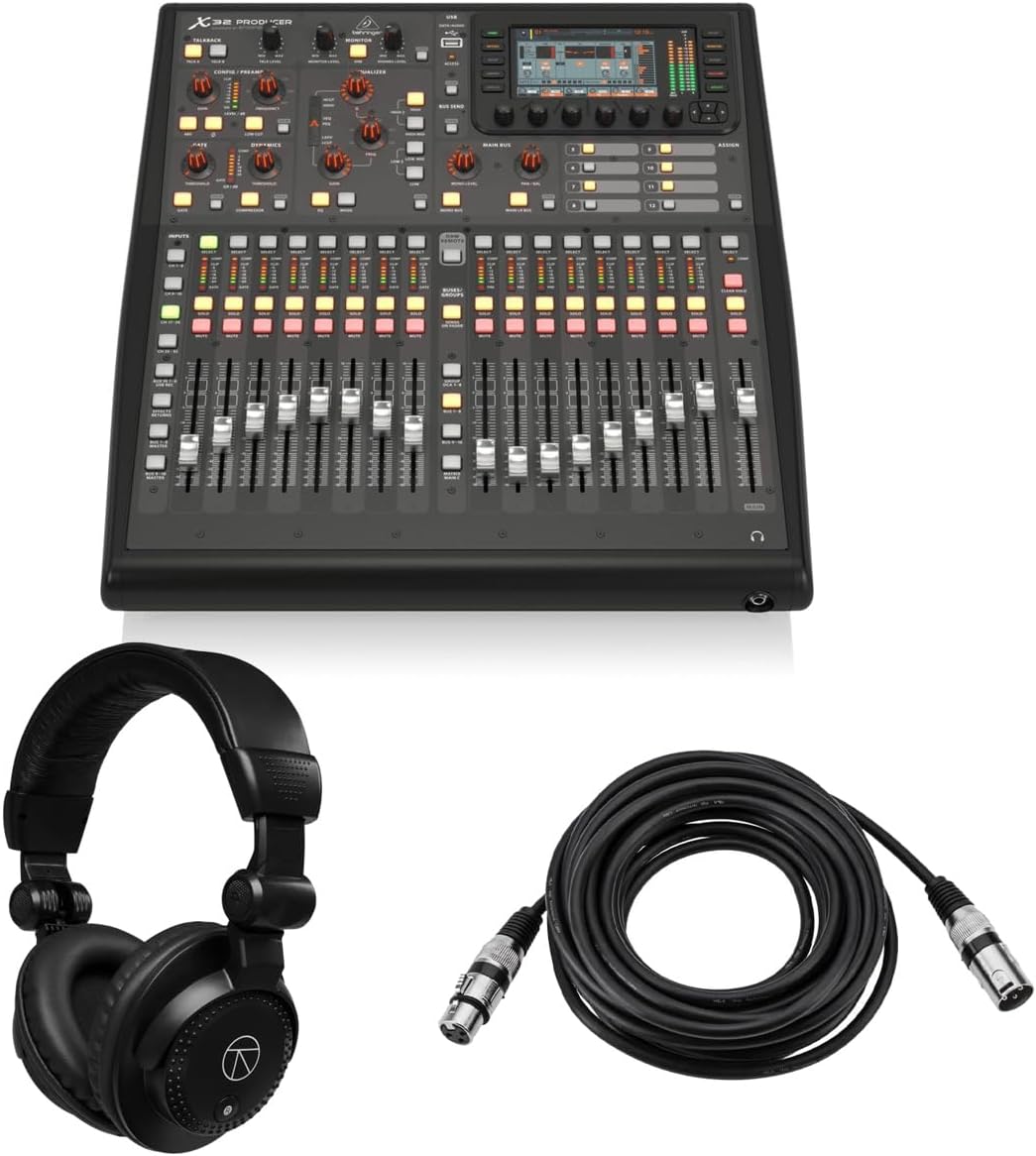
The X32 Producer brings 40-input power to a rack-mountable form factor, earning a 5.0 rating for its robust build and sound quality. It includes 16 Midas preamps and 24-bit conversion, ideal for installed systems and broadcast.
We may earn a commission when you buy through this link, at no additional cost to you.
The included bundle with headphones and cables adds value for immediate setup. Virtual FX simulations like Lexicon 480L provide professional effects, while 100 recall scenes streamline operation for recurring events and shows.
Rack mounting limits physical accessibility compared to tabletop units. The lack of built-in outputs means external interfaces are needed for complex routing, adding to total cost and setup time.
Choose this for installation in racks or mobile units where space is tight. It delivers desktop-quality mixing in a durable package suitable for permanent or touring infrastructure.
The bundle includes essential cables and headphones, reducing initial purchase complexity for new users.
High-end reverbs and effects are emulated digitally, eliminating the need for external hardware processors.
We may earn a commission when you buy through this link, at no additional cost to you.
The Yamaha DM3 offers high-fidelity sound in an ultracompact design with 22 channels and a 9-inch screen. Its 4.4 rating highlights reliable performance and 96kHz sampling, ensuring pristine audio for demanding applications.
We may earn a commission when you buy through this link, at no additional cost to you.
Professional Yamaha preamps deliver clarity and the 18×18 USB interface supports direct recording. The touchscreen simplifies control while the 6 mono or 3 stereo mixes provide flexible routing for various stage configurations.
Fewer buses limit complex scene management. The compact design may feel cramped for larger crews needing physical buttons instead of touch-based controls for quick adjustments.
This console suits mobile engineers, small houses of worship, and streaming setups. It balances portability with the audio quality required for professional results.
96kHz sampling preserves high-frequency detail and reduces aliasing artifacts in critical listening environments.
Large display simplifies navigation through scenes and parameters without cluttering the surface with switches.
We may earn a commission when you buy through this link, at no additional cost to you.
The X32 Compact condenses the full feature set of the flagship into a smaller chassis. With a 4.7 rating, it maintains 40 input channels and MIDAS preamps, making it a powerful choice for space-constrained venues.
We may earn a commission when you buy through this link, at no additional cost to you.
Its 17 motorized faders and LCD Scribble Strips ensure intuitive operation. The 25-bus architecture supports complex routing, and the inclusion of talkback and phones connectors facilitates communication during live shows.
Users still need external I/O to access all inputs physically. The reduced fader count may require more layer switching during complex mixes compared to full-sized units.
Select this for venues needing flagship sound without large footprints. It is ideal for fixed installations or tour trucks where space is at a premium.
Despite smaller size, it retains the same DSP and routing capabilities as the full X32 model.
Integrated talkback and phones connectors simplify on-stage communication and monitoring without extra gear.
We may earn a commission when you buy through this link, at no additional cost to you.
The PreSonus StudioLive Classic focuses on seamless DAW integration with 16 inputs and a 3.9 rating. It features Class A XMAX preamps and Fat Channel processing, delivering consistent sound for live and recording tasks.
We may earn a commission when you buy through this link, at no additional cost to you.
The included Studio One Artist software simplifies recording workflows. MIDI I/O allows control of levels and recall of scenes directly from software, while the 31-band graphic EQ offers main bus shaping.
The interface feels dated compared to modern touch consoles. User reviews cite a steeper learning curve and limited remote control features compared to newer models.
Best suited for existing PreSonus users prioritizing software workflows. It provides reliable sound and recording capabilities for those invested in the ecosystem.
Deep software compatibility allows rapid session setup and control without third-party plugins.
Dedicated processing ensures every channel has consistent dynamics and EQ without external plugins.
We may earn a commission when you buy through this link, at no additional cost to you.
The X Air XR18 enables full control via tablets with a 4.6 rating. Its built-in Wi-Fi router removes the need for external networks, while 16 Midas preamps ensure high-quality audio capture for any source.
We may earn a commission when you buy through this link, at no additional cost to you.
Dugan-style auto mixing manages microphone gain sharing automatically for talkbacks. The 18×18 USB interface supports direct recording on iPads, making it ideal for portable live streaming and broadcast setups.
Reliance on tablet apps limits physical fader access. Battery life on mobile devices can restrict long shows without external power solutions or backup plans.
Choose this for remote mixing, install applications, or small live gigs. It provides professional sound and flexible control without a heavy mixing console.
Built-in router simplifies setup by removing dependency on venue Wi-Fi infrastructure.
Automated gain sharing reduces feedback and ensures clear speech in panels and conferences.
We may earn a commission when you buy through this link, at no additional cost to you.
The Allen & Heath Qu-5 delivers exceptional fidelity with 38 inputs and 96kHz FPGA processing. Its architecture ensures ultra-low latency, making it suitable for high-end recording and live sound requiring precise timing.
We may earn a commission when you buy through this link, at no additional cost to you.
USB-C multitrack recording simplifies capturing raw tracks. The 7-inch capacitive touchscreen and motorized faders provide modern control, while the SLink expansion port supports additional I/O for growing setups.
Higher cost and limited stock can make acquisition difficult. The learning curve is moderate, and specific app compatibility may limit flexibility for non-standard mobile devices.
Ideal for professional install and high-fidelity recording studios. Its processing power supports advanced routing and sound quality expectations for premium productions.
Hardware-based DSP ensures consistent performance and minimal latency even with complex effects chains.
SLink and AES3 support allow integration with larger digital audio systems without bottlenecks.
We may earn a commission when you buy through this link, at no additional cost to you.
The QSC TouchMix-16 is designed for simplicity and sound with 20 full function inputs and a 4.4 rating. Its intuitive workflow includes parametric EQ and dynamics on every channel, simplifying mix setup.
We may earn a commission when you buy through this link, at no additional cost to you.
TRS aux outs drive in-ear monitors directly without extra amps. The included bag protects gear during transport, while the touchscreen allows fast access to essential controls without deep menu diving.
Limited channel capacity restricts large bands. Advanced features like complex matrix routing are absent, which may frustrate engineers needing high customization.
Perfect for solo artists, small bands, and churches needing reliable sound. It balances user-friendliness with essential professional features for consistent results.
TRS aux outputs can drive IEMs directly, saving cost and weight for monitor mixes.
Every channel has gate, compressor, and EQ, ensuring consistent processing without external plugins.
We may earn a commission when you buy through this link, at no additional cost to you.
Selecting the right digital mixing console depends on input needs, sound quality requirements, and workflow preferences. These factors ensure the chosen unit fits your specific production demands.
Determine how many microphones and instruments you need to connect simultaneously. Look for consoles that offer physical inputs or expansion ports to handle your maximum expected setup.
Always verify total I/O counts before purchasing to avoid needing costly external interfaces later.
Microphone preamps define the clarity of your audio. Higher-end preamps reduce noise and distortion, which is essential for vocals and low-level instruments.
Prioritize models with branded preamps for professional-grade sound and dynamic range.
Buses and matrix outputs determine how many monitor mixes or feeds you can create. More buses allow complex setups without external signal processing.
Ensure the console offers sufficient routing for your specific venue or broadcast requirements.
Physical faders and knobs offer tactile control while touchscreens save space. Consider which feels faster and more reliable for your team.
Choose a console that matches your comfort level to reduce operational errors.
USB, Ethernet, and Wi-Fi enable digital recording and remote control. Modern consoles often include audio interfaces for direct computer connection.
Check compatibility with your recording software and streaming platforms before buying.
Digital consoles allow you to save and recall show settings instantly. This feature reduces setup time and ensures consistency between shows.
Look for extensive memory banks and simple recall procedures for complex events.
Built-in reverbs and compressors eliminate the need for external hardware. High-quality emulations save space and cost while maintaining sonic fidelity.
Verify the variety of internal effects to match your genre or vocal processing needs.
Rack-mountable options save space for install while compact models suit travel. Robust build quality ensures reliability under frequent use.
Consider weight, chassis strength, and included accessories for long-term value.
Begin by powering up all connected microphones and interfaces before the console. This prevents loud pops and protects input stages from sudden voltage spikes.
Save scenes immediately after setting levels. Recalling a saved mix ensures you can quickly restore settings if accidental changes occur during a show.
Keep firmware updated to access new features and bug fixes. Regular cleaning of knobs and faders ensures smooth operation and prevents signal issues over time.
Digital consoles offer recallable scenes, integrated processing, and flexible routing that would require extensive hardware in analog systems. This saves time and cost while allowing consistent performance across multiple shows.
Some models like the X32 require remote I/O boxes to access all physical inputs. Always check the console's built-in input count versus your total channel needs before purchasing.
Most modern consoles feature USB audio interfaces allowing direct multitrack recording to computers. Verify the channel count and driver support for your operating system.
Touchscreens offer intuitive control but can lack tactile feedback. Look for units with physical shortcuts or motorized faders to supplement touch navigation during critical moments.
Most manufacturers offer dedicated apps for iPad and Android. Ensure the device is compatible with your tablet OS and supports the necessary features for remote control.
48 kHz is standard for live sound and video while 96 kHz offers higher fidelity for studio work. Match the rate to your final delivery format to avoid conversion artifacts.
Entry-level models simplify workflows with assistive features like auto gain. However, beginners should expect a learning curve compared to basic analog mixers before full mastery.
Use surge protectors and store gear in dry environments. Regularly clean dust from faders and avoid exposing the unit to extreme temperatures or humidity.
These ten options cover a broad range of needs from compact setups to large touring rigs. The Yamaha MGX12 offers value for entry, while the Behringer X32 and WING serve professionals.
Prioritize sound quality, input count, and workflow comfort when making your decision. Ensure the unit supports your future growth and integrates well with existing gear.
Always verify current availability and offers as inventory shifts often. This guide provides a strong foundation to find the perfect console for your audio needs.