
xTool F2 Ultra 60W MOPA & 40W Diode Dual Laser Engraver
4.2Editor score
60W MOPA Fiber Laser Included
100 Plus Color Engraving on Metal
AI Powered Precision Cameras
This guide compares the top 60W laser engravers for precision cutting and engraving across wood, acrylic, and metal for professionals and makers.
Choosing the right 60W laser engraver can transform your workspace into a high-efficiency production hub. These machines offer enough power to cut through thick materials while maintaining the precision needed for intricate designs. Whether you run a small business or are a serious hobbyist, finding a model that balances speed, safety, and versatility is essential for success.
We have evaluated ten leading models based on power output, safety features, workspace size, and software compatibility. Each product was selected for its ability to handle demanding projects ranging from acrylic signage to metal marking. Our analysis focuses on real-world performance metrics that matter most to professionals who need reliable results every day.
Each pick below highlights specific strengths like enclosed safety, camera alignment, or dual-laser systems. You will see detailed breakdowns of how these machines perform on different materials and what makes each unique. Keep in mind that prices and availability change frequently so always verify current details before purchasing your next engraving machine.
4.2Editor score

4.8Editor score

5.0Editor score
This side-by-side comparison highlights key differences in power source, safety ratings, and workspace dimensions across all ten models to help you choose the right fit for your specific engraving needs and budget constraints.




The Creality Falcon2 Pro 60W Laser Engraver and Cutter stands out as a top choice for serious makers and businesses. It combines high power with safety features that make it suitable for professional environments. The fully enclosed design and dual laser system offer versatility that few other machines in this class can match.
We may earn a commission when you buy through this link, at no additional cost to you.
This machine delivers exceptional cutting power with its adjustable 60W output allowing you to switch between 60W 40W and 22W depending on the material. The 60W plus 1.6W dual laser setup lets you handle heavy cutting with the main beam while using the smaller laser for precise positioning. The built-in HD camera streamlines workflow by providing accurate material positioning and live preview which reduces setup time significantly.
While the machine is powerful and versatile the price reflects its professional capabilities. It is also larger than desktop models so workspace planning is important. These trade-offs are acceptable for users who need speed and safety without compromising on performance quality for batch production or detailed engraving work.
If you need a reliable machine for growing business production or serious hobbyist projects this model is an excellent investment. Its combination of power safety and smart features makes it a strong contender for anyone looking to upgrade their engraving capabilities with a professional-grade tool that delivers consistent results.
The fully enclosed Class 1 design minimizes laser exposure and improves smoke containment for a safer workspace.
Using both the 60W and 1.6W lasers allows for greater flexibility and improved accuracy across various projects.
We may earn a commission when you buy through this link, at no additional cost to you.
The Creality Falcon2 Pro 60W Laser Engraver Desktop Diode is designed for professionals who need speed and safety in a compact format. With a native 60W output and engraving speeds exceeding 500mm per second it is built for efficient batch processing. The integrated enclosure ensures safety while the built-in camera simplifies positioning for complex projects.
We may earn a commission when you buy through this link, at no additional cost to you.
This model shines in its ability to cut through 0.3mm stainless steel and 40mm basswood in a single pass. The intelligent focus and camera system reduce manual measurement needs allowing for one-key operation that saves time. Safety features like flame detectors and emergency stop buttons provide peace of mind during long production runs.
Despite its powerful specs the rating suggests some users may have experienced setup or quality inconsistencies. The desktop footprint limits larger projects but the batch processing features offset this for small scale manufacturing. Users should weigh the speed benefits against potential variability in performance before committing to this model.
Ideal for sole traders or small studios needing rapid production this machine delivers high efficiency when tuned correctly. The quick installation and easy cleaning features make it user-friendly even for those new to laser engraving. It is a practical choice for those prioritizing speed and safety in a smaller workspace.
Speeds over 500mm per second enable high-efficiency batch production and significantly reduce processing time for your projects.
Equipped with flame detectors and emergency stops to isolate smoke and dust during the creation process safely.
We may earn a commission when you buy through this link, at no additional cost to you.
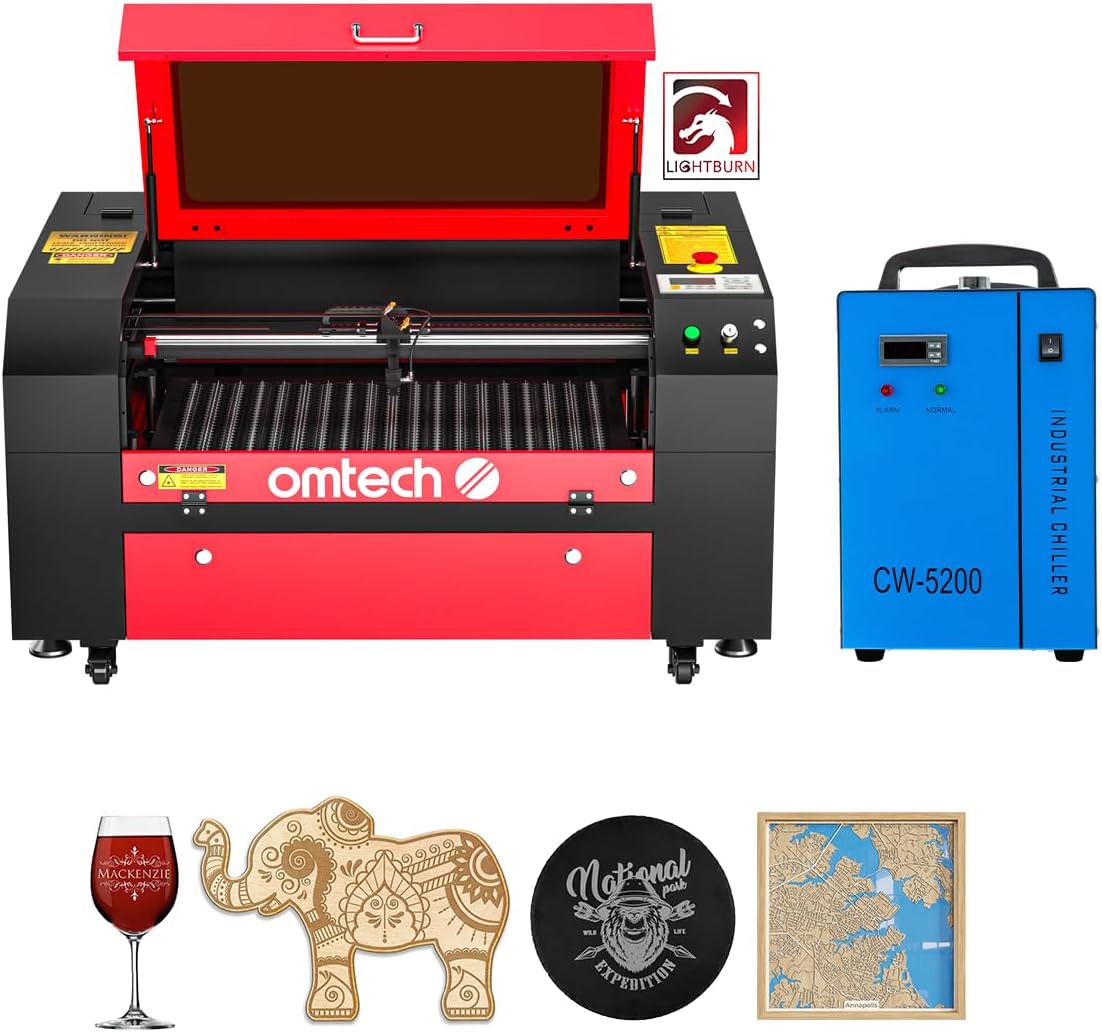
The OMTech Maker 60W CO2 Laser Engraver is a commercial-grade bundle perfect for those handling large items regularly. It comes with a water chiller and LightBurn software to ensure consistent performance. The autofocus and large honeycomb bed make it easy to start engraving immediately without complex setup or manual adjustments.
We may earn a commission when you buy through this link, at no additional cost to you.
Its 20 by 28-inch work area fits most projects and the four-way pass-through doors allow you to accommodate longer items easily. The widened viewing window ensures safe operation while the air assist keeps lenses clear for better cut quality. This machine is designed for those who need reliability and simplicity in their workflow.
While it is an excellent choice for non-metal materials it is limited to Class 2 safety which requires more caution than fully enclosed models. The price is competitive for a bundle that includes a chiller and software. Users who work primarily with wood acrylic and leather will find this machine highly effective for their needs.
If you need a reliable CO2 laser for signs or large home decor items this model offers great value. The autofocus and large bed reduce frustration and improve productivity for everyday projects. It is a strong recommendation for professionals who need consistent results on non-metallic materials.
The 20 by 28-inch bed area accommodates most projects including longer items via four-way pass-through doors.
No more struggling with manual adjustments as the workbeds adjust with the touch of a button for perfect focus.
We may earn a commission when you buy through this link, at no additional cost to you.
The Creality Laser Engraver Falcon2 Pro 60W prioritizes safety with its Class 1 certification and fire-resistant enclosure. It features a dual laser bundle that cuts through 20mm wood and 30mm acrylic quickly. The HD camera visualizes operations but requires LightBurn connection for batch workflows which can be a constraint for some users.
We may earn a commission when you buy through this link, at no additional cost to you.
This model is ideal for small businesses seeking high performance in a safe environment. The auto-stop function ensures work halts if the enclosure opens providing extra protection for users. The exhaust system filters smoke and dust making the workspace cleaner and more comfortable for extended sessions.
While powerful the camera function dependency on LightBurn limits flexibility for users preferring free software. The mid-range rating suggests some users may face learning curves or minor quality issues. However for those who prioritize safety and speed this model delivers a solid balance of features for professional use.
If you need a safe machine for various materials this Falcon2 Pro offers a good mix of power and security. The pre-assembled design and after-sales support make it accessible for beginners. It is a reliable choice for small studios needing efficient engraving without compromising on safety standards.
Certified Class 1 machine with fire-resistant metal enclosure and auto-stop function for users of all levels.
Built-in HD camera makes all operations visualized improving work efficiency with batch engraving capabilities.
We may earn a commission when you buy through this link, at no additional cost to you.
The xTool F2 Ultra 60W MOPA and 40W Diode Dual Laser Engraver is the ultimate powerhouse for versatile engraving. It combines a 60W MOPA fiber laser with a 40W diode to handle everything from metals to wood. The ability to engrave over 100 colors on metal sets it apart for creative custom projects.
We may earn a commission when you buy through this link, at no additional cost to you.
AI-powered precision with dual cameras boosts accuracy to 0.2mm and suggests settings automatically. Operating at speeds up to 15000mm per second it reduces 3D embossing time significantly. The expandable working space supports batch processing making it ideal for high-volume orders with a single setup.
The high cost reflects its industrial capabilities and fiber laser technology. It is heavier and larger than desktop models so workspace planning is essential. These factors are acceptable for users who need true all-metal capability and advanced features like color marking and deep engraving.
If you need a machine that handles all materials with industrial speed this F2 Ultra is unmatched. The pre-set color files save testing time and improve efficiency for complex jobs. It is a top recommendation for professionals who need premium performance and versatility in one unit.
The 60W MOPA fiber laser handles 3D embossing and color engraving on metals like aluminum and stainless steel.
Dual 48MP AI cameras increase positioning accuracy to 0.2mm and boost precision by 60 percent over single cameras.
We may earn a commission when you buy through this link, at no additional cost to you.
The Monport 60W Fiber Laser Engraver is a specialized machine for precision metal marking. It features a lightweight design with a lifespan up to 100000 hours and works with LightBurn software. The customized galvanometer system allows speeds up to 10000mm per second with 0.01mm accuracy for detailed text.
We may earn a commission when you buy through this link, at no additional cost to you.
This model is ideal for engraving rings or business cards due to its 5.9 by 5.9-inch optimal area. The red dot pointer helps with quick positioning and the included software ensures ease of use. It is designed for those who need deep engraving capabilities on metal sheets without complex setups.
While excellent for metal the small working area limits larger projects. The Class 4 rating requires safety precautions like protective eyewear. However the precision and longevity of the fiber laser make it a reliable investment for professional jewelry or industrial marking tasks.
If you focus on metal marking this Monport model offers excellent value with its high accuracy and lifespan. It is a strong choice for businesses needing consistent quality on small metal items. The included BSLcad and LightBurn compatibility ensure flexibility for various design workflows.
Achieves a carving accuracy of 0.01mm with customized galvanometer and F-theta field mirror for detailed work.
The fiber laser offers a lifespan of up to 100000 hours ensuring long-term reliability for your projects.
We may earn a commission when you buy through this link, at no additional cost to you.
The VEVOR 60W CO2 Laser Engraver offers a spacious 24 by 16-inch work area with dual beds for various materials. It is compatible with major software and includes air assist for clean cuts. This model is excellent for non-metal engraving and cutting tasks like acrylic or wood signs.
We may earn a commission when you buy through this link, at no additional cost to you.
Its four-way pass-through design allows you to work with longer items easily. The manual focusing via knob and control panel gives you direct control over the process. The pull-out waste tray simplifies cleanup making it practical for daily use in small businesses.
While it does not handle uncoated metal the large bed and affordable price make it attractive for hobbyists. The manual focus requires precision but allows fine-tuning for different materials. It is a reliable choice for those needing a larger workspace without breaking the bank.
If you need a large CO2 laser for signs or decor this VEVOR model is a solid pick. It is simple to use and offers good value with its spacious design. It is a great recommendation for those focusing on wood and acrylic projects.
The honeycomb and aluminum blade beds provide versatile support for different materials.
Four-way pass-through allows for longer materials and easy manual feeding without limits.
We may earn a commission when you buy through this link, at no additional cost to you.
The OMTech 60W CO2 Laser Engraver features a motorized workbed for easy height adjustments at the touch of a button. It includes a water chiller and supports LightBurn software for intuitive navigation. The large 20 by 28-inch bed with pass-through doors makes it ideal for commercial production.
We may earn a commission when you buy through this link, at no additional cost to you.
It can engrave up to 0.4 inches deep on non-metallic materials with speeds up to 600mm per second. The high-performance DC tube ensures longevity and the air assist keeps cuts clean. This machine is designed for those who need reliability and consistent output in a commercial setting.
While it requires water cooling which adds setup steps the motorized bed saves time. It is a strong option for professional studios needing a commercial-grade setup. The bundle offers good value for those needing consistent results on large projects.
If you need a motorized bed for efficiency this OMTech model delivers on performance. It is a great recommendation for commercial engraving of wood and glass. The chiller and software ensure long-lasting reliability for daily use.
Motorized workbeds adjust up and down with the touch of a button for easy setup and work.
Includes water chiller and LightBurn software for consistent performance and intuitive navigation.
We may earn a commission when you buy through this link, at no additional cost to you.
The Aliencell X1 Lite 60W Photo-Quality Laser Engraver Cutter offers a massive 26 by 21-inch bed for large projects. It includes accurate preview simulation with less than 5 percent deviation reducing waste. The Class 1 enclosed design and auto focus ensure safety and precision for small businesses.
We may earn a commission when you buy through this link, at no additional cost to you.
It features industrial-level speed with a 20kHZ frequency for sharp results even at max acceleration. The Lightburn-ready system allows professional design control and real US-based technical support. The intuitive AI assistant answers setup questions instantly making it user-friendly for new users.
While the price is high the combination of size safety and precision makes it valuable. The accurate preview feature helps reduce guesswork significantly saving time and material. It is a strong recommendation for those needing large formats with professional-grade safety standards.
If you need a large safe machine for batch production this Aliencell model is an excellent choice. It balances speed and safety well with its enclosed design. It is a top pick for small businesses working on large-scale projects.
Space simulates engraving with less than 5 percent deviation to reduce guesswork and waste significantly.
Achieve industrial-level speed with a 20kHZ frequency ensuring clean sharp results at maximum acceleration.
We may earn a commission when you buy through this link, at no additional cost to you.
The Cloudray 60W JPT MOPA Fiber Laser Engraver is ideal for metal fabrication and color marking. It features a JPT source with a 100000-hour lifespan and supports 100 plus color markings. The package includes two F-theta lenses for different precision levels allowing flexibility for your tasks.
We may earn a commission when you buy through this link, at no additional cost to you.
This machine reaches speeds up to 10000mm per second with 0.01mm resolution. It can engrave up to 0.5mm deep for detailed designs and small text. The manual lift column supports large area options and portable design makes it easy to carry for on-site jobs.
While it requires manual setup and lacks a large bed it is excellent for precision metal work. The color marking capability saves testing time and improves efficiency. It is a reliable choice for those focusing on jewelry and detailed metal engraving.
If you need a specialized machine for metal marking this Cloudray model delivers consistent quality. The portable design and color marking features make it unique. It is a strong recommendation for professionals focusing on metal fabrication tasks.
The 60W MOPA source enables 100 plus color markings quickly and efficiently on metal fabrication.
Two F-Theta lenses provide different precision levels allowing flexible working areas for your projects.
We may earn a commission when you buy through this link, at no additional cost to you.
Choosing a 60W laser engraver involves evaluating key factors like power source safety and workspace size to match your specific engraving needs and budget.
A 60W laser provides sufficient power for cutting thick materials like wood and acrylic. Diode lasers are common for desktop units while CO2 and fiber lasers offer specialized capabilities for non-metal or metal engraving respectively. Ensure the power matches your intended materials and production volume.
Select a power type that aligns with your material needs to avoid overpaying or underperforming on key projects.
Safety is crucial for laser engravers especially in professional environments. Class 1 fully enclosed models minimize exposure to harmful rays and reduce smoke risks. Look for features like emergency stops and flame detectors to ensure a safe workspace for all users.
Always prioritize enclosed Class 1 designs for maximum safety during engraving operations.
The size of the engraving bed determines the maximum dimensions of your projects. Desktop models often have smaller beds while commercial units offer larger pass-through options. Measure your typical projects to ensure the workspace fits without limiting your workflow.
Choose a workspace size that accommodates your largest frequent projects to maximize productivity.
Software compatibility affects how easily you can design and send files to your machine. Many units support LightBurn which is popular for its features. Check if the manufacturer includes free software or requires a separate purchase.
Verify software options to ensure you can design without additional costs or compatibility issues.
Cameras improve accuracy by allowing visual alignment of designs on materials. Features like autofocus and live preview reduce setup time significantly. This is especially useful for batch production or complex patterns.
Invest in a model with camera features to save time on manual measurements.
Different lasers handle different materials effectively. CO2 is great for wood and acrylic while fiber is ideal for metals. Ensure the machine you choose supports the range of materials you plan to engrave regularly.
Confirm material compatibility before purchasing to avoid limitations in your projects.
Consider the total cost including accessories and software fees. Some bundles include chillers or software while others do not. Balance the initial investment with the long-term value and features you need.
Evaluate the total package cost to ensure you get the best value for your budget.
Reliable after-sales support is essential for troubleshooting and maintenance. Look for units offering warranties and technical assistance. This ensures you have help if issues arise with your machine.
Choose a brand with strong support to keep your business running smoothly.
Always read the user manual thoroughly before operating your 60W laser engraver to understand safety protocols and basic controls. Proper setup includes ensuring the machine is on a stable surface and ventilation is adequate.
Regularly clean the laser lens and mirrors with approved materials to maintain precision. Check the exhaust system to prevent smoke buildup which can affect engraving quality.
Store your machine in a dry environment to protect electronic components from moisture. Schedule periodic maintenance checks to ensure all safety features remain functional.
A 60W laser engraver can cut materials like wood acrylic leather and some coated metals. CO2 and fiber variants handle different specific materials better so check your model capabilities.
Yes if you choose a Class 1 enclosed model with safety features like emergency stops. Proper ventilation and protective gear are recommended for optimal safety.
LightBurn is a popular choice for its compatibility with most engravers. Some manufacturers include free alternatives but LightBurn offers advanced features for professionals.
Lifespan depends on the laser type and usage. Diode and fiber lasers often last tens of thousands of hours with proper maintenance and care.
Yes fiber lasers in 60W models can mark and engrave metals effectively. Diode lasers may only mark coated metals or dark plastics.
Cameras are optional but highly recommended for accuracy and batch processing. They reduce manual measurement time significantly.
We have reviewed the top 60W laser engravers for professional and hobbyist needs. Our picks highlight a range of models from budget-friendly to premium options.
Consider your material needs safety preferences and workspace size before choosing. Balancing power with ease of use ensures you get the most out of your investment.
Remember to verify current availability and details before purchasing as inventory changes. This guide provides a reliable starting point for finding your ideal machine.