
ARCTIC Liquid Freezer III Pro 420 A-RGB
4.6Editor score
Optimized contact pressure distribution
Integrated VRM fan cooling
Native offset mounting support
High-performance computing demands efficient thermal management to prevent overheating and maintain stability during intensive tasks. The 420mm Aio Liquid Cooler category offers exceptional heat dissipation capabilities for enthusiasts and professionals alike. Selecting the right unit requires understanding key specifications and compatibility with your specific hardware setup.
We analyzed ten leading models based on cooling efficiency, noise levels, build quality, and additional features like LCD displays or RGB lighting. Each product was evaluated against common user needs including socket compatibility, pump reliability, and radiator thickness. Our goal is to provide a clear overview of what each cooler brings to the table.
Every pick in this list highlights unique strengths whether you prioritize budget-friendly performance or premium aesthetics with advanced monitoring. Detailed reviews cover installation processes, software integration, and long-term durability considerations for each model. Please note that pricing and availability can change frequently so verify current details before purchasing.
4.6Editor score

4.7Editor score

4.4Editor score
As an Amazon Associate we earn from qualifying purchases.
This side-by-side comparison highlights the core specifications and unique selling points of each featured cooler to simplify your decision-making process. We focus on physical dimensions, pump types, fan configurations, and special features like LCD screens or VRM cooling integration.


The ARCTIC Liquid Freezer III Pro 420 A-RGB stands out as an exceptional value proposition for users seeking top-tier cooling without the premium price tag. With a solid 4.6-star rating this cooler delivers robust thermal management for high-performance CPUs using Intel LGA1851 or AMD sockets. Its design focuses on efficiency through optimized contact pressure distribution and a dedicated VRM fan to keep voltage regulators cool during heavy workloads.
We may earn a commission when you buy through this link, at no additional cost to you.
Key strengths include the P14 PRO fans which offer superior airflow while remaining quiet especially at lower speeds. The native offset mounting system shifts the cold plate center towards the CPU hotspot ensuring more efficient heat transfer from the processor die. Cable management is simplified as PWM cables are integrated into the hose sheathing reducing visible clutter inside your case for a cleaner aesthetic.
Honest trade-offs involve the radiator thickness which might be challenging in smaller cases and basic RGB software compared to dedicated hubs. These issues are acceptable given the price point and performance levels offered. The integrated VRM fan is a rare feature at this price ensuring motherboard stability alongside CPU cooling.
This cooler is ideal for budget-conscious enthusiasts who want high-end features like VRM cooling and offset mounting without overspending. It is highly recommended for builds prioritizing raw cooling efficiency and clean cable routing over flashy displays. Verify case clearance before purchase due to the thick radiator design.
The contact frame ensures longer CPU life and better heat dissipation through optimized pressure distribution across the die surface.
A PWM-controlled fan lowers voltage converter temperatures ensuring reliable performance during overclocking or sustained high loads.
We may earn a commission when you buy through this link, at no additional cost to you.
This variant of the ARCTIC Liquid Freezer III Pro offers similar performance to the A-RGB model but focuses on core cooling capabilities. It maintains the high 4.4-star rating by delivering effective heat dissipation through its 420mm radiator and three 140mm fans. The design emphasizes reliability with optimized contact pressure and offset mounting for better thermal transfer.
We may earn a commission when you buy through this link, at no additional cost to you.
The P14 PRO fans provide powerful airflow while staying quiet which is critical for noise-sensitive environments. Integrated VRM cooling ensures voltage converters do not overheat during intensive tasks. Cable management is streamlined by embedding PWM cables within the hose sheathing reducing clutter inside the chassis for a professional look.
Trade-offs include the bulky radiator profile which may not fit mid-tower cases easily and minimal RGB options compared to other brands. These are acceptable compromises for a unit focused on function over form. The offset mounting is a significant advantage for heat dissipation efficiency on modern CPUs.
Buyers seeking raw cooling power without paying for extra features should consider this model. It suits users with large cases and standard motherboard setups who value thermal stability. Ensure your case supports the radiator thickness before installation.
Shifting the cold plate center towards the CPU hotspot ensures more efficient heat transfer and cooler processor temperatures.
Single visible cable connection reduces internal clutter and simplifies the installation process significantly.
We may earn a commission when you buy through this link, at no additional cost to you.
The be quiet! Silent Loop 3 420mm earns the Editor's Choice award for its exceptional balance of cooling power and noise reduction. With a remarkable 4.7-star rating it uses a 3-chamber pump design to reduce turbulences and noise significantly. This makes it ideal for silent workstations or media centers where acoustic comfort is paramount.
We may earn a commission when you buy through this link, at no additional cost to you.
Key strengths include the dampened and adjustable pump with a 6-pole motor that ensures reliable performance without humming. The three Silent Wings 4 140mm PWM fans deliver high-speed cooling while maintaining virtually inaudible operation. Wide CPU plate coverage with threadripper support ensures it handles high-end workstation CPUs effectively.
Trade-offs involve a higher price point compared to budget models and standard RGB lighting that lacks advanced customization features. These are acceptable given the premium build quality and acoustic performance. The pump design is specifically engineered to minimize vibration and sound waves.
This cooler is best for users prioritizing silence and reliability over flashy aesthetics. It is highly recommended for professional environments or quiet home setups. Verify compatibility with your specific CPU socket before purchasing.
Powerful 3-chamber pump design significantly reduces turbulences and noise for a quieter computing experience.
Three Silent Wings 4 fans provide incredible cooling performance with engineered cooling block technology.
We may earn a commission when you buy through this link, at no additional cost to you.
This model delivers consistent cooling performance typical of the ARCTIC Liquid Freezer series. With a 4.4-star rating it focuses on thermal efficiency through optimized contact pressure distribution and native offset mounting. The P14 PRO fans provide more power at any speed ensuring optimal cooling under high load conditions.
We may earn a commission when you buy through this link, at no additional cost to you.
The integrated VRM fan lowers the temperature of voltage converters ensuring reliable performance during sustained tasks. Integrated cable management hides PWM cables in the hose sheathing so only a single visible cable connects to the motherboard. This design detail reduces clutter and simplifies the build process for users.
Trade-offs include the radiator thickness which may restrict case compatibility and basic RGB software compared to competitors. These are acceptable given the strong thermal results and price. The offset mounting helps ensure efficient heat transfer directly from the CPU hotspot.
Ideal for users needing reliable thermal management with clean cable routing. It is highly recommended for standard high-performance builds without tight space constraints. Verify case dimensions before purchasing to avoid clearance issues.
Integrated VRM fan lowers temperature of voltage converters ensuring reliable performance and system stability.
Single visible cable connection reduces internal clutter and simplifies the installation process significantly.
We may earn a commission when you buy through this link, at no additional cost to you.
The NZXT Kraken Elite 420 RGB leads the premium category with its stunning 2.72-inch IPS LCD featuring crisp 640 x 640 resolution. It offers superior cooling through a custom-designed NZXT Turbine pump that cools even heat-prone CPUs efficiently. This model is perfect for users wanting high-end aesthetics without sacrificing thermal performance.
We may earn a commission when you buy through this link, at no additional cost to you.
Key strengths include the large display allowing you to monitor real-time system performance or show personalized GIFs and images. Integration with Google Photos Spotify and YouTube adds unique customization options. Pre-applied thermal paste and tool-free mounting brackets for latest AMD and Intel sockets simplify installation significantly.
Trade-offs involve the very high price point compared to standard models and an RGB Core fan that offers limited customization. These are acceptable given the premium build quality and unique display features. The Turbine pump ensures high flow rate and head pressure for stability.
Best for enthusiasts seeking a unique visual centerpiece for their system. It is highly recommended for large cases with space for the radiator. Ensure you have the budget for this premium option before purchasing.
Large 2.72-inch IPS LCD features crisp 640 x 640 resolution and ultra-bright backlight for vibrant display.
Pre-applied thermal paste and tool-free mounting brackets streamline setup for latest AMD and Intel sockets.
We may earn a commission when you buy through this link, at no additional cost to you.
Geometric Future Eskimo Pro offers strong cooling features with its advanced K6 liquid pump delivering 1.5 L/min flow rate. A large 55.8 x 55.8mm copper base ensures efficient heat absorption from the CPU. The design targets modern users with latest Intel and AMD socket compatibility including AM5 and LGA1700.
We may earn a commission when you buy through this link, at no additional cost to you.
Key strengths include a vibrant ARGB diffused CPU block that adds visual appeal alongside performance. Pre-installed high-static pressure Squama 2503 ARGB fans ensure effective airflow through the 420mm radiator. Compatibility with latest sockets allows for future-proofing in new system builds.
Trade-offs involve being a newer brand which may imply less long-term reliability data and software integration that can be basic. These are acceptable given the strong hardware specs and price. The large copper base is a significant advantage for heat transfer.
Ideal for users wanting high flow rates and ARGB aesthetics at a reasonable price. It is highly recommended for those building with AM5 or LGA1700 CPUs. Verify software support before installation to ensure full RGB functionality.
Advanced K6 liquid pump with 1.5 L/min flow rate ensures efficient coolant circulation and thermal management.
Large 55.8 x 55.8mm copper base provides optimal contact area for efficient heat transfer.
We may earn a commission when you buy through this link, at no additional cost to you.
ASUS ProArt LC 420mm is designed for professionals prioritizing stability and high airflow with minimal noise. It utilizes Noctua NF-A14 industrialPPC-2000 PWM fans which deliver exceptional airflow. The illuminated meter indicates live system load temperatures and fan speeds offering useful monitoring without software.
We may earn a commission when you buy through this link, at no additional cost to you.
Key strengths include a thicker radiator with larger coolant storage to deliver enhanced cooling performance. The 450mm of reinforced sleeved tubing offers durability flexibility and chassis compatibility. Minimalist design perfectly complements the aesthetics of ProArt-family components for a professional build.
Trade-offs involve the high price point and limited RGB customization compared to gaming-focused coolers. These are acceptable for a unit targeting reliability and industrial-grade components. The Noctua fans are known for longevity and quiet operation.
Ideal for workstation users needing reliable thermal management without flashy RGB. It is highly recommended for ProArt ecosystem builds. Verify case clearance for the thick radiator before purchase.
Noctua NF-A14 industrialPPC-2000 PWM fans deliver high airflow with minimal noise for professional environments.
Illuminated meter indicates live system load temperatures and fan speeds for instant visual feedback.
We may earn a commission when you buy through this link, at no additional cost to you.
Thermaltake TH420 V2 Ultra brings industrial aesthetics with a 2.1-inch LCD display showing 16.8M color videos or photos. It supports a wide range of sockets including Intel LGA 2066 and AMD AM5. The high-performance copper base plate accelerates heat conductivity effectively keeping the copper plate continuously cool.
We may earn a commission when you buy through this link, at no additional cost to you.
Key strengths include the ability to sync with major motherboard RGB software like ASUS Aura Sync and MSI Mystic Light Sync. New design maintains same quality with an industrial look that freshens up the classic V2. The reliable pump enables maximum water circulation for sustained cooling.
Trade-offs involve a lower average rating which may indicate some user issues and software dependencies like TT RGB Plus 2.0. These are acceptable if you value the display features. The copper base ensures strong thermal conductivity.
Ideal for users seeking LCD customization at mid-range prices. It is highly recommended for those with large cases and compatible motherboards. Check software compatibility before purchasing.
480×480 high resolution shows 16.8M color videos or photos for easy customization and monitoring.
High-performance copper base plate accelerates heat conductivity ensuring the copper plate stays continuously cool.
We may earn a commission when you buy through this link, at no additional cost to you.
MAGFloe 420 Ultra features a massive 3.95-inch square LCD display showing pictures videos and data. It includes MAGForce 2.0 design with improved pin to pad contacts to prevent signal drop out. The 140mm SWAFAN delivers 3.17mm of static pressure and 81.6 CFM of airflow in standard mode.
We may earn a commission when you buy through this link, at no additional cost to you.
Key strengths include magnetic daisy chain cables that make linking multiple fans together easy. Included reverse blades allow you to easily change the direction of airflow so the LED side remains visible. Compatibility with Intel LGA 1851 and AMD AM5 ensures broad support.
Trade-offs involve the low average rating which suggests potential reliability issues and signal drop out risks. These are acceptable if you prioritize customization features. The magnetic system is convenient for cable management.
Ideal for users prioritizing display size and magnetic convenience over reliability. It is highly recommended for builds needing specific airflow directions. Verify compatibility with your motherboard software.
MAGForce 2.0 drastically increases surface area to prevent signal drop out from misalignment.
Included reverse blades allow you to easily change the direction of airflow to keep LED visible.
We may earn a commission when you buy through this link, at no additional cost to you.
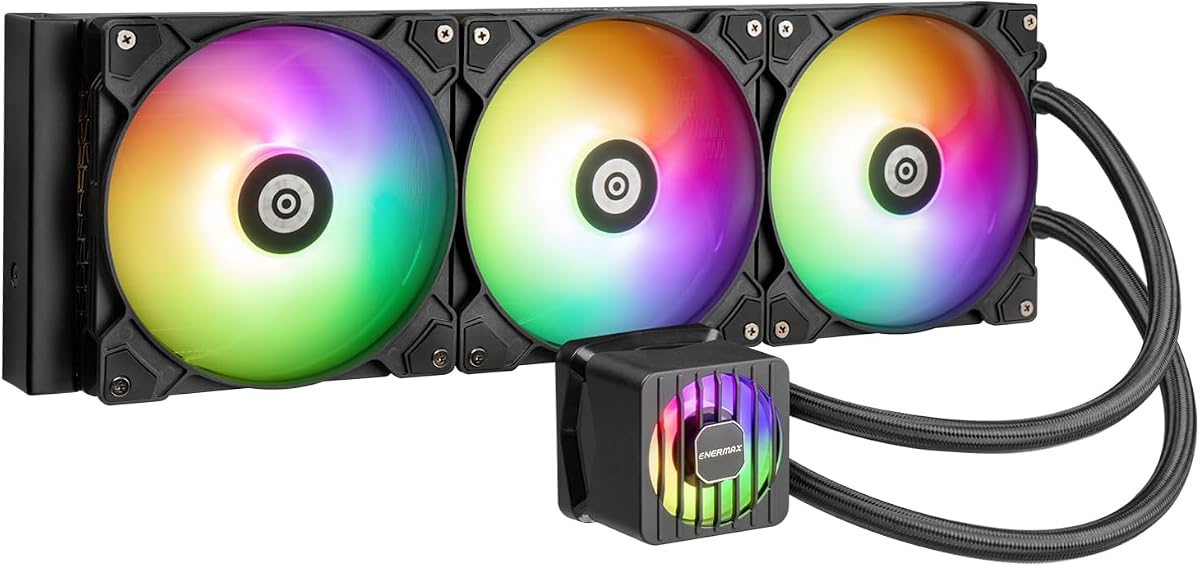
ENERMAX LIQMAXFLO 420mm offers high performance with a pump speed up to 3000RPM and a 38mm thick radiator. A 60mm VRM fan ensures voltage converters stay cool. The pressure-optimized silent 140mm FDB PWM fan provides automatic control for enhanced silence and cooling performance.
We may earn a commission when you buy through this link, at no additional cost to you.
Key strengths include extensive compatibility with Intel LGA 1700 and AMD AM5. A magnetic detachable pump cover can be rotated 90° for easy customisation. Pre-applied premium Dow Corning TC-5888 thermal grease ensures effortless installation for users.
Trade-offs involve potential noise at high pump speeds and limited RGB features compared to branded software coolers. These are acceptable given the performance specs. The VRM fan adds stability during heavy loads.
Ideal for users prioritizing raw pump performance and VRM cooling. It is highly recommended for high-end CPU builds. Ensure your case supports the thick radiator design.
High performance pump up to 3000RPM ensures aggressive cooling during intensive workloads.
60mm VRM fan lowers voltage converter temperature ensuring reliable system stability under load.
We may earn a commission when you buy through this link, at no additional cost to you.
Selecting the right 420mm Aio Liquid Cooler requires balancing cooling performance, noise levels, and compatibility with your hardware setup.
A 420mm radiator is typically 440mm long and 140mm wide. Ensure your case supports this width and thickness which often reaches 30mm or more. Check fan clearance and clearance from motherboard VRMs.
Always verify case specs against your cooler dimensions before purchasing to avoid fitting issues.
Higher pump RPM usually translates to better flow rate and cooling performance. Look for pumps above 2000 RPM for intensive workloads. Some models feature dampened motors to reduce noise at high speeds.
Select a pump with adequate flow rate to match your radiator size and CPU heat output.
Quality PWM fans with FDB bearings provide better durability and lower noise. Silent models use specific blade shapes to reduce turbulence. Check decibel ratings for your preferred noise tolerance levels.
Prioritize fans with high static pressure for pushing air through dense radiators.
Ensure the cooler supports your current CPU socket like LGA1700 or AM5. Newer Intel sockets require specific mounting kits. Most units include brackets for modern sockets.
Always check the manufacturer's socket list for confirmed compatibility.
Some coolers include VRM fans or LCD displays. VRM fans protect motherboard components during overclocking. LCD screens allow system monitoring or custom media playback.
Decide if these extra features justify the cost increase for your use case.
Integrated cable management systems hide wires inside hose sheathing. Tool-free mounting brackets speed up assembly. Pre-applied thermal paste saves time during setup.
Look for designs that minimize visible cables inside your build.
RGB software control varies by brand. Some sync with motherboard software like ASUS Aura Sync. Others require proprietary apps for customization. Ensure the software supports your motherboard.
Check if your motherboard software supports the cooler's RGB protocols.
Reliable brands offer 5 to 6 year warranties. Check leak policies and customer support reputation. High-quality tubing resists leaks and ensures long-term safety.
Always purchase from reputable brands with strong after-sales support.
Clean dust from radiator fins and fans regularly using compressed air to prevent airflow blockage. Dust buildup restricts cooling efficiency and causes overheating. Aim to clean every three months depending on environment dust levels.
Check pump performance by listening for humming or unusual vibrations. If the pump is silent or noisy verify power connections and headers. Replace failed units immediately to prevent CPU damage from overheating.
Ensure all screws are tightened evenly during installation. Uneven pressure can reduce cooling efficiency and damage the CPU. Recheck connections after a few weeks of use.
You typically need a case width of at least 440mm to fit the radiator. Check your case support for 420mm cooling and front fan clearance. Some cases support 420mm rad mounts internally which may reduce available space.
Most mid-towers do not support 420mm radiators without specific clearance. Full-tower cases usually accommodate this size better. Always check the manufacturer's supported radiator dimensions before buying.
Quality units last 5 to 6 years with proper maintenance. Pumps may fail sooner depending on motor type. Always check warranty terms for leak coverage and replacement policies.
Mount the radiator first then attach fans to the case or radiator. Mount the pump block on the CPU using included brackets. Connect pump and fans to motherboard headers and power.
A VRM fan cools voltage converters around the CPU socket preventing overheating. This is crucial for overclocking or high-end workloads. It improves system stability during intensive tasks.
Most units come with pre-applied thermal paste so extra is not needed. Extra tubes may be provided for maintenance or re-thermal. Verify package contents before installation.
This guide highlighted top performers like the ARCTIC Liquid Freezer III Pro for value and the be quiet! Silent Loop 3 for silence. Each model offers unique features suitable for different user needs and budgets.
Prioritize cooling efficiency and case compatibility when selecting your unit. Ensure your motherboard supports RGB syncing if you plan to use lighting features. Verify socket compatibility to avoid mounting issues.
Always check current prices and availability before purchasing. Pricing fluctuates often so compare multiple retailers for the best deal. Verify warranty terms before finalizing your choice.