
GLDRAM Cooling Fan for Nintendo Switch OLED
4.4Editor score
14 game card slots
Blue light tech design
Type-C cable included
ABS durable material
This expert guide compares the top cooling fan options for Nintendo Switch docks to help you choose the best model for performance, noise, and compatibility.
Gaming sessions can get intense, and overheating is a real concern for console owners. A dedicated cooling fan for the Nintendo Switch dock ensures your system stays cool during long playtimes. This guide explores the best options available to keep your device running smoothly and efficiently.
We have carefully analyzed ten top-rated cooling solutions based on user feedback, technical specifications, and design features. Our comparison covers various styles including replacement docks, external attachments, and multi-fan systems. Each product was evaluated for cooling efficiency, noise levels, and ease of installation for your setup.
Each pick in this list highlights specific strengths such as adjustable speeds, LED displays, or extra storage slots. We focus on how these features impact your actual gaming experience. Please note that product availability and pricing may change frequently, so verify details before purchasing your next accessory.
4.4Editor score

4.6Editor score

4.0Editor score
This side-by-side comparison highlights the key specifications and unique features of each cooling solution. Whether you need extra storage or silent operation, these details help you find the perfect fit for your gaming environment.




This cooling fan replacement kit stands out as the top choice for Switch owners seeking reliable thermal management. With a high rating of 4.6 stars, it offers a comprehensive solution including LED displays for temperature and speed. The design ensures your console stays cool without interrupting your gameplay sessions.
We may earn a commission when you buy through this link, at no additional cost to you.
The standout feature is the digital LED display showing real-time RPM and air temperature in Celsius. This transparency helps you monitor thermal load instantly. Adjustable speeds from 510 to 6000 RPM let you balance noise and cooling power. The fixed pad and joystick caps add practical value to the package.
While the fan is nearly silent under 2400 RPM, it does produce some spinning sound at maximum settings. This is a minor trade-off for the strong ventilation performance it provides. The Micro USB connection is simple but requires an available port on your dock or adapter.
Ideal for hardcore gamers who play for hours and worry about overheating pauses, this unit delivers consistent protection. The lifetime warranty and quick customer service make it a risk-free investment for your console's longevity. It is the best overall choice for comprehensive cooling needs.
The LED display allows you to see exactly how hot the exhaust air is, giving you confidence that the system is working effectively.
Three physical buttons let you increase or decrease fan speed easily, ensuring you can adapt to any game intensity or room temperature.
We may earn a commission when you buy through this link, at no additional cost to you.
The TNP cooling fan is designed specifically for the original Nintendo Switch dock, providing triple fan ventilation for efficient heat dissipation. It aims to prevent overheating and system malfunctions during long gaming sessions. The compact design saves space on your TV stand while maintaining strong performance.
We may earn a commission when you buy through this link, at no additional cost to you.
Built with three high-speed fans, this unit offers robust cooling power to keep the console temperature low. You can switch between Turbo, Normal, and Off modes to suit your needs. Installation is straightforward, requiring no tools as you simply insert it onto the back of the dock.
Despite its strong cooling claims, it holds a lower rating of 3.9 stars compared to others. This might indicate inconsistencies in build quality or noise levels during actual use. The simplicity of the switch control limits fine-tuned adjustment options for different scenarios.
For users with the original dock who need a basic cooling solution without extra features, this is a viable option. It is best suited for those who prioritize airflow volume over precise speed control. Check recent reviews to ensure current manufacturing standards meet expectations.
Using three fans instead of one increases the surface area for air movement, helping to cool the internal components more effectively.
The shape is tailored to fit the original dock seamlessly, ensuring stability without needing extra adhesives or mounts.
We may earn a commission when you buy through this link, at no additional cost to you.
This NEWDERY cooling stand is built for the newer Switch 2 dock, offering dual-fan technology and extensive connectivity. It features automatic operation when connected and three-stage cooling levels for precise thermal control. The design includes 6 game card slots and multiple USB ports for a complete hub experience.
We may earn a commission when you buy through this link, at no additional cost to you.
The dual-fan setup promotes effective heat dissipation, helping to prevent lag or crashes during intense play. With 9 vibrant RGB light modes, you can match your setup to any gaming scene. The expansion ports allow easy connection of controllers, headsets, or smartphones without clutter.
While powerful, this unit is optimized for the Switch 2 dock which may limit compatibility with older models. The RGB lights add style but can be turned off if you prefer a minimalist look. It serves as a comprehensive station rather than just a cooling fan.
Gaming looking for an all-in-one accessory that combines cooling, storage, and charging should consider this premium option. It extends the lifespan of your console while providing a sleek aesthetic upgrade. Ensure your dock model matches before purchasing to avoid fit issues.
With three USB output ports, this stand acts as a hub for accessories, reducing cable clutter and keeping everything within reach.
The fan operates automatically when connected to the dock, ensuring cooling starts exactly when you need it without extra steps.
We may earn a commission when you buy through this link, at no additional cost to you.
This GLDRAM cooling fan is a budget-friendly replacement specifically designed for the 2021 OLED dock HEG-007. It features a high-efficiency fan that blows directly onto the base to dissipate heat quickly. The unit includes 14 game card slots on top, adding significant storage value.
We may earn a commission when you buy through this link, at no additional cost to you.
The fan is made from durable ABS material, keeping it lightweight yet strong. Blue LED light integrated into the fan opening gives it a tech-inspired look that matches the OLED dock. Installation is quick, following the design of the official base for a perfect fit.
While it lacks variable speed controls, the simple on/off button is convenient for basic cooling needs. The price point makes it an accessible upgrade for many owners looking to protect their console without spending much. Some may prefer more customization in speed settings.
For OLED owners wanting extra storage and basic cooling at a low cost, this is an excellent choice. It keeps the device cool even during charging sessions. Always verify your dock model number to ensure compatibility before ordering.
The 14 slots on top allow you to store and access your favorite game cards quickly without digging through drawers.
Designed specifically for the HEG-007 model, it fits the contours of the official base perfectly without gaps or instability.
We may earn a commission when you buy through this link, at no additional cost to you.
The Dobe cooling fan is designed specifically for the Switch OLED model base, offering a quiet yet powerful cooling solution. It uses a high-speed fan to speed up air circulation inside the host base for effective heat dissipation. The blue LED lighting syncs with the fan switch for a cohesive experience.
We may earn a commission when you buy through this link, at no additional cost to you.
Powered by the TYPE-C header adapter, it connects easily to the console base for supply. The white color matches the OLED console aesthetic, ensuring your setup looks neat. Users report that it stays cool even after hours of play with no input delay.
While it only has a single fan, its performance is sufficient for most standard gaming scenarios. The lack of speed control limits fine-tuning, but the simplicity is a plus for plug-and-play users. It is a specialized accessory not compatible with original or Lite models.
If you own an OLED Switch and want a clean looking cooling accessory, this is a solid pick. It helps prevent overheating without adding much noise to your room. Confirm your dock model matches the required TYPE-C interface before buying.
The light turns on and off with the fan, removing the need for separate switches and keeping the setup tidy.
This fan improves air flow inside the base itself, targeting heat at the source for efficient cooling.
We may earn a commission when you buy through this link, at no additional cost to you.
This cooling fan features a stylish white design with blue LED lights to match your OLED setup perfectly. It uses a 3000 RPM fan to accelerate airflow and cools the dock efficiently. The compact design ensures your gaming setup stays tidy while providing necessary thermal protection.
We may earn a commission when you buy through this link, at no additional cost to you.
Plugging directly into the USB port of your OLED station makes power supply easy without extra adapters. It claims to instantly cool the dock for better heat dissipation during intense sessions. The price point is very affordable for the features offered.
With no rating data available, it is harder to gauge user satisfaction compared to other models. The basic feature set means there are few customization options for speed or lighting. However, its simplicity makes it a low-risk option for basic needs.
Ideal for users seeking an aesthetic upgrade with functional cooling, this fan blends well with modern setups. It is best for those who do not need advanced controls but want reliable performance. Check current availability and compatibility before purchasing.
The white color and blue light are chosen to enhance the look of your gaming setup rather than just function.
Designed to increase airflow instantly, it aims to reduce heat buildup quickly during long play sessions.
We may earn a commission when you buy through this link, at no additional cost to you.
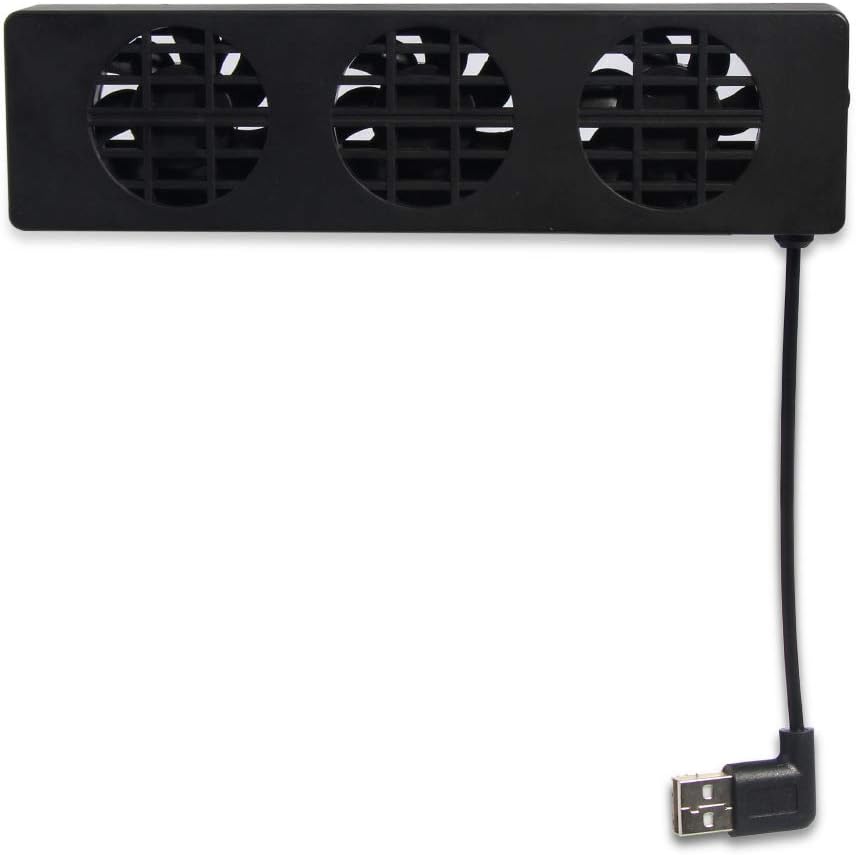
This Bewinner cooling fan is a versatile option designed for game consoles, featuring three cooling fans inside for effective heat dissipation. The compact design makes it easy to set up and use without cluttering your space. A side switch allows you to adjust speed between Turbo and Normal modes.
We may earn a commission when you buy through this link, at no additional cost to you.
It is built from superior materials ensuring durability during regular use. The bracket acts as a holder to keep the console cool while gaming. Since it is generic, it may fit various docks but requires checking dimensions for a stable fit.
While the three fans promise strong ventilation, the lack of a specific dock model might affect stability for some users. The side switch is accessible but basic. This model offers good value for those needing a simple multi-fan solution.
For gamers who want a multi-fan approach without investing in a full replacement dock, this is a good choice. Ensure it matches your console size before use to avoid tipping or misalignment. Read user feedback for compatibility tips.
Three fans working together provide a broader area of airflow, helping to reduce hot spots on the console.
The side switch lets you quickly toggle between turbo and normal modes depending on how hot your game runs.
We may earn a commission when you buy through this link, at no additional cost to you.
The OSTENT cooler is designed to increase airflow to the console, helping speed up heat exchange. It includes three cooling fans that provide powerful ventilation to reduce temperature quickly. A switch allows you to choose between Turbo and Normal speeds for different gaming needs.
We may earn a commission when you buy through this link, at no additional cost to you.
It is powered via the USB port on the dock, so no extra power is needed. The design is easy to insert onto the back of the dock, making setup straightforward. Its small size makes it easy to carry out and store when traveling.
With a rating of 3.7, some users may have encountered issues with noise or build quality. The plastic feel might not match premium docks but serves the functional purpose well. It is a basic but effective tool for thermal management.
For gamers on a budget who need a quick cooling solution for multiple consoles, this option works well. Ensure the fit is secure on your specific dock to avoid slippage. Check reviews for any specific model warnings.
Its small size means you can pack it in a travel bag without taking up much room when you are on the go.
Since it runs off the dock's USB port, it does not require any additional cables or outlets.
We may earn a commission when you buy through this link, at no additional cost to you.
This cooling fan fits well with the Switch original dock and also supports Steam Deck. It offers a vertical stand and adjustable speed via USB power. The LED display shows real-time fan speed and exhaust temperature clearly. The package includes a fixed stabilizer pad and joystick caps.
We may earn a commission when you buy through this link, at no additional cost to you.
Speed ranges from 510 RPM to 6000 RPM to meet different needs. It runs nearly silent below 2400 RPM which balances cooling and noise. The sponge pad is anti-slip and prevents the console from being scratched. Lifetime warranty provides added assurance of quality.
With no rating data available, it is new or less reviewed compared to others. The multi-device compatibility is a strong point for owners of multiple consoles. Ensure your USB power source is sufficient for stable operation.
For versatile users who want one cooling solution for Switch and Deck, this is a promising option. The included accessories add value beyond just cooling. Check current support details and compatibility lists before ordering.
Compatible with Switch OLED and Steam Deck, this fan can protect multiple devices in your home without buying separate units.
The included sponge pad keeps the setup stable and ensures your console stays scratch-free during use.
We may earn a commission when you buy through this link, at no additional cost to you.
This cooling fan is designed specifically for the Switch OLED model dock, featuring a sleek black finish. It aims to provide efficient cooling for your dock setup. The rating of 4.0 indicates solid user satisfaction. While details are limited, the focus is on matching your OLED console aesthetic.
We may earn a commission when you buy through this link, at no additional cost to you.
The product title is in Japanese, which may limit accessibility for some buyers. However, the design is tailored for the OLED dock ensuring a good fit. The black color helps it blend seamlessly with black setups or accessories.
With minimal English descriptions available, verifying compatibility through images is recommended. It is a niche option for those who prefer specific color schemes or have access to Japanese models. The build quality likely aligns with standard console accessories.
For Switch OLED owners seeking a color-matched accessory, this is an intriguing choice. Ensure your dock matches the required type before purchasing. If you value aesthetics, this model complements the console well.
The black color helps it blend seamlessly with your existing console setup and accessories for a uniform look.
Designed specifically for the OLED dock model, it ensures a precise fit without wobble or loose connections.
We may earn a commission when you buy through this link, at no additional cost to you.
Choosing the right cooling fan depends on your specific dock model and gaming needs. Here are the key factors to consider.
Ensure the fan matches your Switch model whether original, OLED, or Switch 2. Some units are designed for specific docks and will not fit others. Check product descriptions for model numbers to avoid buying an incompatible accessory.
Always verify the exact dock model before purchasing to ensure a secure fit and proper power connection.
Look for fans with high RPM ranges or multiple fans for better heat dissipation. Adjustable speeds allow you to increase cooling when playing intense games. LED displays for temperature can help you monitor how well the system is working.
Higher RPM and multiple fans generally provide better cooling for long gaming sessions.
Cooling fans can produce noise especially at high speeds. If you prefer a quiet environment, look for models that offer silent modes or lower RPM ranges. Reading user reviews regarding noise during actual use helps set expectations.
Silent operation is key if you want to avoid distracting noise while gaming.
Most fans draw power from the dock USB port but some may require extra adapters. USB powered units are easier to set up and do not need extra outlets. Check if a cable is included and if it matches your connection needs.
USB powered designs simplify setup by using existing dock ports.
Some models include extra slots for game cards, RGB lights, or USB expansion ports. These features add value but may increase cost or complexity. Decide which extras matter most for your setup and prioritize accordingly.
Extra storage and ports can enhance convenience but are secondary to cooling performance.
Materials like ABS plastic offer durability and resistance to wear. Check if the unit includes stabilizer pads to prevent slipping. Good build quality ensures the fan lasts longer and protects your console from scratches.
Durable materials and anti-slip pads improve longevity and safety.
A good warranty and responsive customer service are vital for electronics. Some brands offer lifetime warranties and quick resolution for issues. This protects your investment if the product fails or does not work as expected.
Look for sellers who provide clear warranty terms and reliable support.
Installation should be straightforward without requiring tools. Plug and play designs save time and make setup accessible for all users. Simple mechanisms mean you can start cooling immediately after unboxing.
No-tool installation is preferred for convenience and speed.
First, ensure your dock is powered off before attaching the cooling fan. Align the unit with the back of the dock and secure it using the provided pads or clips. Connect the power cable to a USB port on the dock or a compatible power source.
Turn on the cooling fan using the switch on the side of the unit. Adjust the speed to a low setting if you prefer quieter operation. Monitor the LED display to see the fan speed and exhaust temperature during gameplay.
Regularly clean the fan blades and dust filters to maintain optimal airflow. Use a soft brush or compressed air to remove debris without damaging the components. Keep the area around the dock clear to ensure proper air circulation.
Yes, a cooling fan helps prevent overheating by improving airflow around the dock and console. It lowers the internal temperature and reduces the risk of unexpected pauses. This is especially useful during long gaming sessions or in warm environments.
A replacement dock includes a fan as part of the entire dock unit, while a cooling attachment is a smaller accessory added to the original dock. Replacement docks may offer more features but are costlier. Attachments are simpler and cheaper.
Many fans are designed specifically for the OLED model, but you must check product descriptions for compatibility. Some units like the GLDRAM or Dobe fan fit only OLED docks. Others may fit multiple models, so verify before purchasing.
Most fans use the dock USB port for power supply. Simply plug the cable into the USB port between the HDMI and power cord. Some require a Type-C cable or Micro USB cable depending on the model.
Noise levels depend on the fan speed. Lower speeds are usually nearly silent while higher speeds produce more sound. If noise is a concern, choose a model with variable speed settings so you can balance cooling and quiet.
Using external accessories typically does not void your console warranty unless they cause physical damage. However, check with Nintendo support for specific policies. Ensure the fan is installed correctly to avoid risks.
Some models like the GLDRAM and NEWDERY include game card slots on the top or side. This allows you to store and access game cards conveniently. Others focus solely on cooling without extra storage.
Some versatile models designed for both the Switch and Steam Deck. Check product descriptions for compatibility lists. These universal units offer flexibility if you own multiple devices and want one cooling solution.
This guide reviewed ten top cooling options for the Nintendo Switch dock helping you choose based on your needs. The TNP model offers excellent value with speed controls while the NEWDERY unit provides premium features like RGB lights and USB ports.
When selecting a fan, prioritize compatibility with your dock model and noise levels for your environment. Extra features like game slots or LED displays can enhance convenience but ensure core cooling performance is strong enough for your play habits.
Remember to verify current availability and model specifics before purchasing as offerings change over time. Choose a unit that matches your setup and budget to protect your console and enhance your gaming sessions.