
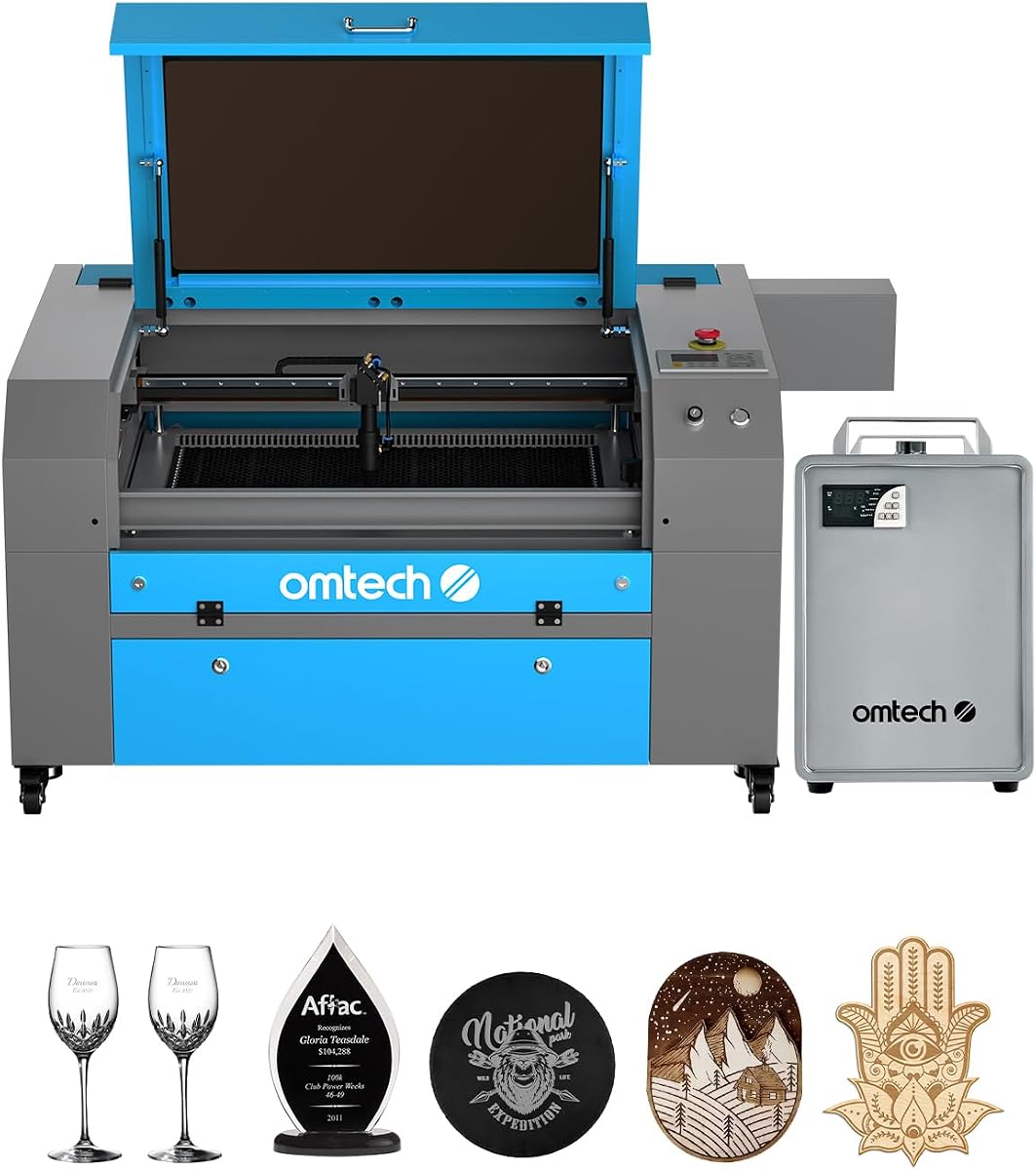
OMTech K40+ 45W Desktop CO2 Laser Engraver & Cutter
4.4Editor score
45W upgraded laser power
Supports LightBurn software
Integrated air assist system
This guide compares the top ten CO2 laser cutters available today based on power, speed, safety features, software support, and overall performance for diverse
Selecting the right CO2 laser cutter involves evaluating power output, workspace size, and safety systems. High-performance models enable precise cutting of acrylic wood and leather while maintaining consistent speed. Professional users need robust cooling and reliable software integration for uninterrupted production workflows.
We evaluated ten leading machines using detailed specifications and user feedback. Our analysis focuses on laser tube longevity air assist efficiency and build quality. Each product offers unique strengths ranging from compact desktop units to industrial-grade systems designed for heavy daily usage.
Every recommendation highlights key advantages and potential limitations for informed decisions. Ratings reflect verified performance metrics and customer satisfaction across various project types. Prices fluctuate frequently so verify current listings before purchasing to ensure optimal value for your specific manufacturing needs.
4.4Editor score

4.5Editor score

4.8Editor score
The following table provides a side-by-side comparison of all ten selected CO2 laser cutters highlighting essential specifications such as wattage working area safety class and software compatibility for quick reference.



The xTool P3 80W Flagship represents the pinnacle of intelligent laser automation with a 4.5 star rating. It combines industrial-grade power with a revolutionary Place and Go workflow that simplifies complex operations significantly.
We may earn a commission when you buy through this link, at no additional cost to you.
Its Automated Creation System integrates LiDAR ranging for perfect autofocus while dual HD cameras ensure microscopic alignment accuracy. The variable batch fill feature with spreadsheet import streamlines mass customization for efficient production runs.
While the investment is substantial the Class 1 safety design with active detection offers unmatched peace of mind. Smart Nesting minimizes waste and maximizes efficiency making it ideal for professional production environments.
This machine is best for businesses needing high throughput and automated workflows. If you prioritize safety and precision over upfront cost the P3 delivers unmatched performance for serious CO2 laser cutting projects.
The ACS system handles setup automatically saving valuable time on every job.
Class 1 safety rating allows safe operation without special eye protection.
We may earn a commission when you buy through this link, at no additional cost to you.
The OMTech K40+ 45W offers an accessible entry into CO2 laser cutting with a strong 4.4 star rating. Its upgraded power slices through common materials like acrylic and wood with surprising ease for its price.
We may earn a commission when you buy through this link, at no additional cost to you.
Support for LightBurn and LaserGRBL ensures seamless workflows for beginners and experts. The integrated air assist system clears debris effectively reducing fire risk and protecting the lens during cutting jobs.
While manual adjustments are required for focus the compact design fits easily in small workspaces. The 24/7 support team provides guidance ensuring you resolve issues quickly without downtime.
This unit suits hobbyists and small businesses seeking affordability. Prioritize this model if you need a reliable workhorse for standard materials without breaking your budget.
Delivers professional features at a fraction of industrial machine prices.
Round-the-clock technical guidance helps new users get started confidently.
We may earn a commission when you buy through this link, at no additional cost to you.
VEVOR 100W earns a perfect 5.0 star rating for its spacious 24×35 inch workspace and reliable performance. It handles materials up to 0.59 inches thick in one pass making it versatile for diverse projects.
We may earn a commission when you buy through this link, at no additional cost to you.
The front and back pass-through doors accommodate large or long items effortlessly. An intelligent laser head ensures smooth incisions without burr while the red-dot pointer clearly indicates the engraving point.
Despite the large footprint the digital control panel integrates seamlessly with third-party software like AutoCAD. Secure operation features like automatic power cutoff on door opening enhance safety for continuous work.
Ideal for users needing large format capabilities the VEVOR balances power and size. Choose this machine for high throughput in workshops where space allows for significant equipment.
Pass-through doors allow handling of oversized materials without repositioning.
Honeycomb bed structure ensures high structural stability during cutting.
We may earn a commission when you buy through this link, at no additional cost to you.
The OMTech Maker 90W features a bundled water chiller ensuring stable performance during long engraving sessions. The Yongli H2 tube delivers 90W of power for up to 8000 hours of reliable usage.
We may earn a commission when you buy through this link, at no additional cost to you.
Honeycomb and aluminum blade beds support various material types while four-way pass-through doors handle large items efficiently. The widened viewing window made from flame-retardant material enhances visibility and safety.
Built-in air assist protects lenses and mirrors by removing smoke and dust effectively. Cover interlocks automatically cut the beam when opened prioritizing user safety during operation.
This machine suits commercial users needing consistent output. The chiller integration eliminates extra purchases and simplifies setup for focused professional production.
Included chiller maintains optimal temperature for extended operational runs.
Pass-through doors enable handling of oversized workpieces easily.
We may earn a commission when you buy through this link, at no additional cost to you.
OMTech Maker 60W impresses with a 4.7 star rating and a bundle including LightBurn software and water chiller. Autofocus eliminates manual guesswork adjusting the bed at the touch of a button.
We may earn a commission when you buy through this link, at no additional cost to you.
Safety features include a flame-retardant viewing window and efficient air assist that protects optics from debris. The compact 20×28 inch work area accommodates most standard project sizes comfortably.
Consistent performance ensures clean laser engraving results. The bundled software allows immediate use without additional licensing costs saving time and money.
Ideal for users seeking value the Maker 60W balances performance with essential accessories. Prioritize this if you want a ready-to-run package for professional results.
Includes LightBurn and chiller for immediate workflow start.
Autofocus ensures accurate depth and consistent engraving results.
We may earn a commission when you buy through this link, at no additional cost to you.
OMTech K40+ V2 earns a 4.5 star rating for its compact design and high-speed engraving capabilities. It slices through acrylic and wood with ease while maintaining precision for complex designs.
We may earn a commission when you buy through this link, at no additional cost to you.
The honeycomb bed handles flat items effectively while an optional rotary axis expands creative possibilities. Local demos and 24/7 global support ensure personalized care for local users.
Air assist auto-adjusts airflow based on laser power protecting the lens and reducing fire risk. Emergency stop and door protection enhance safety during intense production sessions.
Perfect for makers needing speed and flexibility this model fits small spaces well. Choose this for detailed work where rapid turnaround is essential.
High engraving speeds reduce time on bulk orders significantly.
Local demos and global help ensure smooth operation always.
We may earn a commission when you buy through this link, at no additional cost to you.
OMTech Pronto 100W offers revolutionary engraving speeds of up to 39.4 inches per second thanks to powerful 100W laser tube technology. Its advanced autofocus ensures consistent high-quality results with minimal setup.
We may earn a commission when you buy through this link, at no additional cost to you.
The 40×24 inch work area handles large items with two-way pass-through doors. A powerful air pump removes smoke and dust to protect optics and enhance cut quality.
Comprehensive safety features including water protection and temperature alarms prioritize user safety. The laser tube delivers up to 12000 hours of usage for long-term reliability.
This machine suits professionals needing efficiency and large format capacity. Prioritize speed and reliability for high-volume commercial work with this model.
High speeds transform creative visions into reality faster than ever.
Multi-layered protection ensures safe engraving without interruptions.
We may earn a commission when you buy through this link, at no additional cost to you.
OMTech Pronto 130W earns a perfect 5.0 star rating for its high-power 130W CO2 laser engraving capabilities. It engraves deeply on materials like wood and glass at speeds up to 1000mm/s.
We may earn a commission when you buy through this link, at no additional cost to you.
Autofocus technology eliminates guesswork allowing immediate work with precise focal distance. The 51×35 inch area accommodates large projects while two-way pass-through doors simplify handling.
Global support ensures 24/7 expert assistance for technical guidance. Safety features cover all bases including water protection and emergency stop for peace of mind.
Ideal for creatives needing top-tier power the Pronto 130W delivers consistent quality. Prioritize this if you need maximum power for industrial tasks.
130W power handles dense materials efficiently and effectively.
Autofocus ensures consistent and repeatable engraving accuracy.
We may earn a commission when you buy through this link, at no additional cost to you.
OMTech K40+ V3 remains a reliable entry-level choice for new makers. With a standard 45W laser power it handles common materials effectively for personal projects.
We may earn a commission when you buy through this link, at no additional cost to you.
Class 2 safety features and standard door protection ensure secure operation. Compact design allows fitting in small home workshops without sacrificing core functionality.
Setup is straightforward with basic controls suitable for beginners. Air assist maintains lens health ensuring clean cuts and consistent engraving.
Best for those starting out this model offers value and simplicity. Prioritize this if you need a straightforward tool for hobby projects.
Simple controls and price make it perfect for first-time users.
Standard safety ensures safe operation without complex setup.
We may earn a commission when you buy through this link, at no additional cost to you.
OMTech Pro 130W stands out as a premium industrial option with a built-in CW-5200 water chiller and 130W laser power. It maintains stable temperatures ensuring consistent performance across high-volume production.
We may earn a commission when you buy through this link, at no additional cost to you.
Servo motors and ball-bearing guide rails achieve engraving speeds up to 1200mm/s. Ruida 6445G touchscreen control and WiFi connectivity streamline operations for efficient management.
Futuristic design with tri-color status lights and widened viewing windows enhance visibility. Four-way pass-through doors handle large materials with ease for professional use.
Ideal for large businesses needing speed and precision. Prioritize this for industrial tasks where uptime and reliability are critical.
Ruida touchscreen simplifies complex workflow management significantly.
Built-in chiller ensures stability during continuous operation.
We may earn a commission when you buy through this link, at no additional cost to you.
Choosing the right CO2 laser cutter depends on multiple critical factors that affect performance and safety.
Laser power determines the maximum material thickness a machine can cut effectively. Higher wattage like 100W or 130W enables faster cutting speeds and thicker material handling than entry-level 45W models. Ensure the power aligns with your regular production needs to avoid bottlenecks.
Higher wattage supports thicker materials and faster throughput efficiently.
Workspace dimensions define the maximum size of material you can process in one operation. Larger beds accommodate full sheets or oversized parts reducing repositioning time. Consider your typical project sizes to prevent oversizing or undersizing your investment.
Adequate workspace minimizes repositioning and speeds up production workflows.
Safety ratings like Class 1 or Class 2 indicate how well the machine protects users from hazardous laser radiation. Features such as lid interlocks and emergency stops prevent accidental exposure. Always prioritize models with robust safety systems especially if operating in shared environments.
Prioritize safety systems like interlocks to protect users effectively.
Support for industry-standard software like LightBurn or LaserGRBL ensures seamless workflow integration. Check if the manufacturer provides proprietary tools or supports open-source options. Flexible software support allows future upgrades and easier file management.
Open software support provides flexibility and avoids vendor lock-in.
A water chiller is essential for high-power machines to dissipate heat generated during operation. Built-in chillers save space and simplify setup. Ensure the cooling system maintains consistent temperature to extend tube lifespan.
Effective cooling preserves tube life and ensures stable performance.
Air assist clears smoke and debris from the cutting zone improving cut quality and preventing fire hazards. Look for integrated systems that auto-adjust based on power settings. Proper air assist protects optics and reduces carbonization on wood materials.
Strong air assist protects lenses and improves cut quality.
Comprehensive warranties and accessible technical support reduce downtime during critical periods. Manufacturers offering 24/7 global assistance ensure quick problem resolution. Verify warranty duration for tubes and electrical components before purchasing.
Strong support guarantees quick issue resolution during operation.
Linear guide rails and high-quality motors ensure smooth precise movement across axes. Metal frames reduce vibration for cleaner cuts. Durability impacts long-term accuracy and maintenance frequency significantly.
Solid construction and quality motion systems maintain long-term accuracy.
Always verify material compatibility before starting jobs to prevent fires or fumes. Use proper ventilation and wear safety glasses if not using a Class 1 enclosure. Ensure the workspace is clean and free of flammable debris.
Calibrate the focal length regularly to maintain precision. Use the autofocus feature if available or follow manual calibration steps. Adjust speed and power settings based on material thickness and desired finish.
Clean optics and replace air filters periodically to avoid degradation. Monitor water levels in chillers and check for leaks frequently. Store materials flat to prevent warping and ensure consistent engraving depth.
CO2 lasers handle non-metallic materials like wood acrylic leather cardboard and fabric effectively. They cannot cut metals but can mark coated metals. Avoid PVC due to toxic chlorine gas fumes.
A water chiller is essential for tubes over 60W to prevent overheating. It maintains stable temperatures during long sessions protecting the tube. Small units may use air cooling but chillers extend lifespan significantly.
LightBurn is widely supported across most models for intuitive design control. LaserGRBL works well with GRBL-based systems. Ensure compatibility with your operating system for smooth integration.
Avoid running the tube at 100% power for extended periods. Keep coolant levels full and replace filters periodically. Check mirrors for dust and clean them gently with appropriate solvents.
Class 1 machines offer the highest safety with enclosed beams. Class 2 units require more caution. Always verify certification from recognized bodies before purchasing for peace of mind.
Cutting speed depends on power and material thickness. Higher wattage units can cut acrylic twice as fast as lower wattage models. Optimizing settings improves speed without compromising quality.
Proper ventilation is mandatory to remove smoke and fumes safely. Many units come with built-in fans but an external extractor is recommended. Check local codes for exhaust requirements.
Standard CO2 lasers cannot cut raw metal but may mark coated surfaces. Fiber lasers are required for metal cutting. Ensure your machine model matches material needs precisely.
We highlighted ten top CO2 laser cutters including xTool P3 and OMTech Pronto. Each offers unique strengths for different budget and production needs.
Prioritize power size and safety features that match your regular work volume. A reliable chiller and software compatibility often determine long-term satisfaction.
Prices change frequently so check current listings before finalizing purchase. Verify warranty terms and support availability for future maintenance needs.